
Streamble Http Mcp Client
FreeNot checkedReal-time conversational chatbot using Streamable HTTP, Semantic Kernel, and Azure OpenAI to discover and serve food recipes via an MCP server.

About
Real-time conversational chatbot using Streamable HTTP, Semantic Kernel, and Azure OpenAI to discover and serve food recipes via an MCP server.
README
This project is a conversational chatbot that helps users find food recipes, search by ingredients, and get detailed cooking instructions. It leverages Microsoft Semantic Kernel, Azure OpenAI, and a custom MCP (Model Context Protocol) server for food recipes.
This client is designed to work with the streamable-http-mcp-server.
UI Example
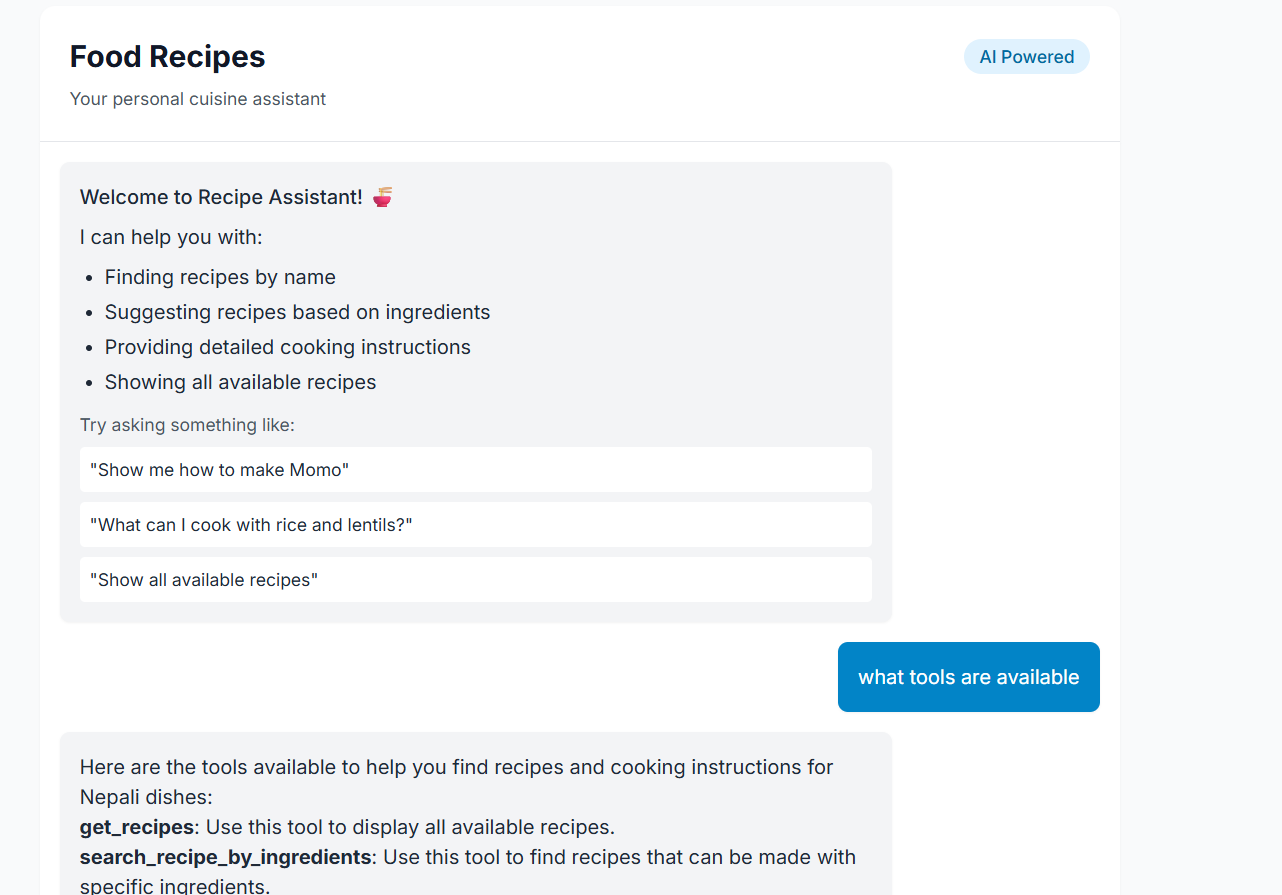
You can also build a web-based UI to chat with the MCP server, providing a more interactive experience. The UI can help users:
- Find recipes by name
- Suggest recipes based on ingredients
- Get detailed cooking instructions
- Show all available recipes
Below is an example of such a UI in action:
Features
- Conversational chatbot interface
- Uses Azure OpenAI for natural language understanding
- Integrates with a Food Recipe MCP server via HTTP
- Supports:
- Listing all available recipes
- Searching recipes by ingredients
- Searching recipes by name
- Providing user-friendly, formatted responses
Prerequisites
- Python 3.8+
- Azure OpenAI resource (API key, endpoint, deployment)
- Access to a running Food Recipe MCP server
Installation
- Clone this repository or copy the project files.
- Install dependencies:
pip install -r requirements.txt
Configuration
Create a .env file in the project directory with the following variables:
AZURE_OPENAI_API_KEY=your-azure-openai-api-key
AZURE_OPENAI_ENDPOINT=your-azure-openai-endpoint
AZURE_OPENAI_DEPLOYMENT_NAME=your-azure-openai-deployment-name
AZURE_OPENAI_API_VERSION=your-azure-openai-api-version
FOOD_MCP_SERVER_URL=http://your-mcp-server-url
AZURE_OPENAI_API_KEY: Your Azure OpenAI API keyAZURE_OPENAI_ENDPOINT: Your Azure OpenAI endpoint URLAZURE_OPENAI_DEPLOYMENT_NAME: The deployment name for your Azure OpenAI modelAZURE_OPENAI_API_VERSION: The API version (e.g.,2024-02-15-preview)FOOD_MCP_SERVER_URL: The URL of your Food Recipe MCP server
Usage
Run the chatbot with:
python foodRecipeClient.py
You will see:
Welcome to the Food Recipe chat bot!
  Type 'exit' to exit.
Type your questions or requests, such as:
- "Show me all recipes."
- "What can I cook with chicken and rice?"
- "Find a recipe called 'Spaghetti Bolognese'."
Type exit to quit the chat.
How It Works
- The chatbot uses Azure OpenAI to interpret user input and decide when to call MCP tools.
- The following MCP tools are available:
get_recipes: List all recipessearch_recipe_by_ingredients: Find recipes by ingredientsget_recipe_by_name: Find a recipe by its name
- The bot always uses these tools for accurate information and never makes up recipes.
- Responses are formatted for readability, and ingredient matches are explained.
Project Structure
foodRecipeClient.py: Main chatbot clientrequirements.txt: Python dependenciespyproject.toml: Project metadata
Troubleshooting
- Ensure all environment variables are set in
.env. - Make sure your Azure OpenAI and MCP server credentials are correct.
- If you encounter import errors, check that all dependencies are installed.
License
This project is licensed under the MIT License. You are free to use, modify, fork, or improve this project as you wish.
See the LICENSE file for full license text.
Installing Streamble Http Mcp Client
This server has no published package — it is built from source. Open the repository and follow its README.
▸ github.com/purunep/streamble-http-mcp-clientFAQ
Is Streamble Http Mcp Client MCP free?
Yes, Streamble Http Mcp Client MCP is free — one-click install via Unyly at no cost.
Does Streamble Http Mcp Client need an API key?
No, Streamble Http Mcp Client runs without API keys or environment variables.
Is Streamble Http Mcp Client hosted or self-hosted?
Self-hosted: the server runs locally on your machine via the install command above.
How do I install Streamble Http Mcp Client in Claude Desktop, Claude Code or Cursor?
Open Streamble Http Mcp Client on unyly.org, pick your client tab (Claude Desktop, Claude Code, Cursor) and press Install — the config is generated automatically, no JSON editing.
Related MCPs
Fetch
Web content fetching and conversion for efficient LLM usage.
AWS KB Retrieval
Retrieval from AWS Knowledge Base using Bedrock Agent Runtime.
 by modelcontextprotocol
Spring AI MCP Server
Provides auto-configuration for setting up an MCP server in Spring Boot applications.
llm-analysis-assistant
A very streamlined mcp client that supports calling and monitoring stdio/sse/streamableHttp, and can also view request responses through the /logs page. It also
 by xuzexin-hz
Compare Streamble Http Mcp Client with
Not sure what to pick?
Find your stack in 60 seconds
Author?
Embed badge for your README
Browse similar
All ai MCPs