
SUMO
FreeNot checkedSUMO-MCP 是一个连接大语言模型 (LLM) 与 Eclipse SUMO 交通仿真的中间件。通过 Model Context Protocol (MCP),它允许 AI 智能体(如 Claude, Cursor, TRAE等)直接调用 SUMO 的核心功能,实现从OpenStreetMap 数据获取、路网生成、

About
SUMO-MCP 是一个连接大语言模型 (LLM) 与 Eclipse SUMO 交通仿真的中间件。通过 Model Context Protocol (MCP),它允许 AI 智能体(如 Claude, Cursor, TRAE等)直接调用 SUMO 的核心功能,实现从OpenStreetMap 数据获取、路网生成、需求建模到仿真运行与信号优化的全流程自动化。
README






SUMO-MCP is a middleware layer connecting Large Language Models (LLMs) with Eclipse SUMO traffic simulation. Through Model Context Protocol (MCP), AI agents (such as Claude, Cursor, and TRAE) can directly call SUMO capabilities for end-to-end automation across OpenStreetMap data retrieval, network generation, demand modeling, simulation execution, and signal optimization.
The system supports both offline workflows (file-based pipelines) and online interaction (real-time TraCI control), covering use cases from macroscopic planning to microscopic control.
API reference: doc/API.md (the single source of truth remains tool registration in src/server.py).
ezdesignX conversion guide: doc/EZDESIGNX_TO_SUMO.md.
Core Features
1. Unified Toolchain
Core MCP interfaces are grouped into intuitive tools to simplify common SUMO operations:
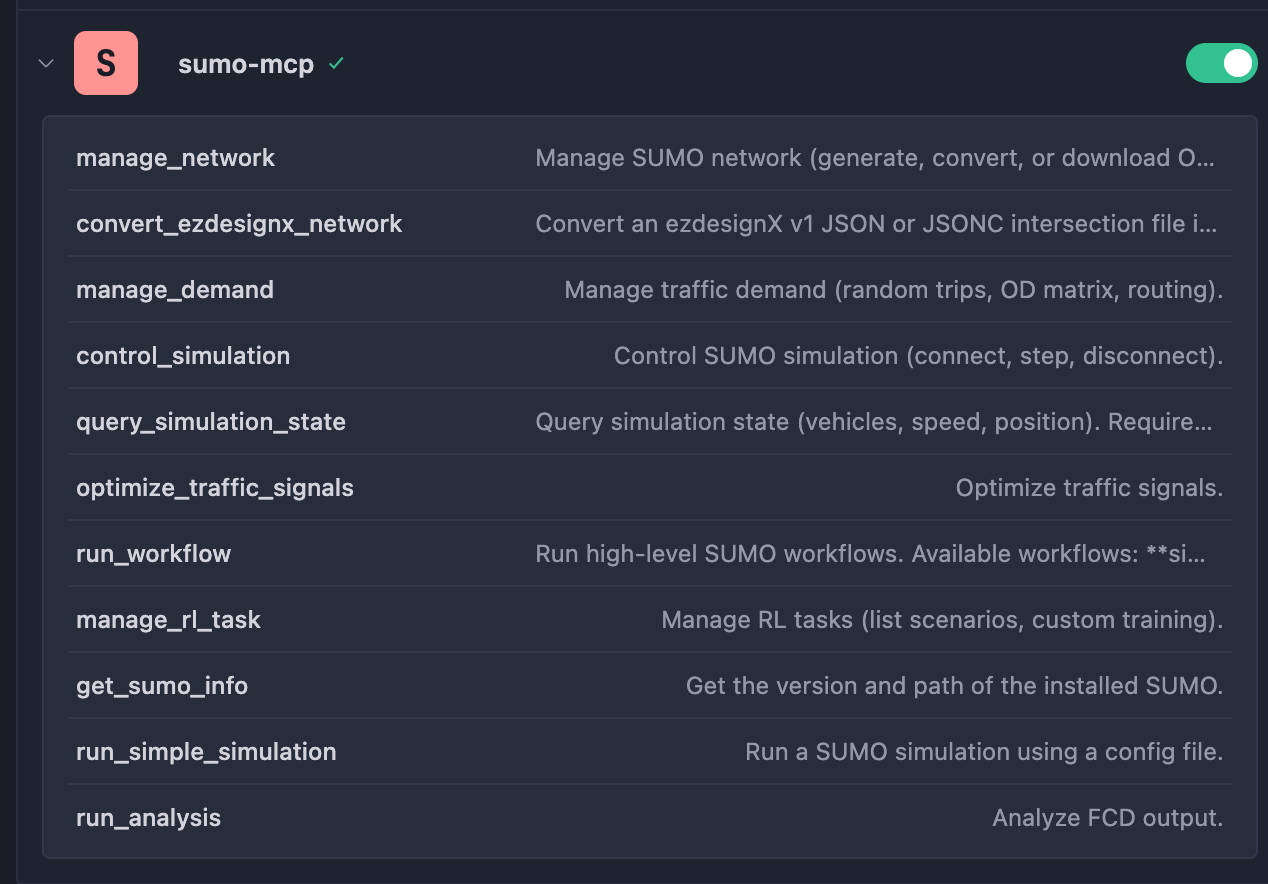
- Network Management (
manage_network): Generate networks (generate), download OSM data (download_osm), convert formats (convert), and convert ezdesignX v1 JSON/JSONC (convert_ezdesignx). A dedicatedconvert_ezdesignx_networktool is also available. - Demand Management (
manage_demand): Generate random trips (generate_random), convert OD matrices (convert_od), and compute routes (compute_routes). - Signal Optimization (
optimize_traffic_signals): Includes cycle adaptation (cycle_adaptation) and coordination (coordination).cycle_adaptationoutputs SUMO<additional>signal plans (automatically mounted into<additional-files>by workflows). - Simulation & Analysis: Run standard config-based simulation (
run_simple_simulation) and FCD trajectory analysis (run_analysis).
Some aggregated tools accept params.options: list[str], which are appended token-by-token to underlying SUMO binaries/scripts (see "General Conventions" in doc/API.md).
2. Online Interaction
Real-time control via TraCI enables fine-grained closed-loop operations:
- Simulation Control (
control_simulation): Connect (connect), step (step), and cleanly disconnect (disconnect). - State Query (
query_simulation_state): Fetch active vehicle IDs (vehicle_list), per-vehicle variables (vehicle_variable), and global simulation statistics.
3. Automated Workflows
Built-in end-to-end workflows (run_workflow) for research and engineering tasks:
- Sim Gen & Eval (
sim_gen_eval): One-shot pipeline: "generate network -> generate demand -> route computation -> simulation -> analysis".- Params:
grid_number(aliases:grid_size,size),sim_seconds(aliases:steps,duration,end_time),output_dir
- Params:
- Signal Optimization (
signal_opt): Full pipeline: "baseline simulation -> optimization -> optimized simulation -> comparison" with automatic handling of<additional>outputs.- Params:
net_file(required),route_file(required),sim_seconds(aliases:steps,duration),use_coordinator,output_dir
- Params:
- RL Training (
rl_train): Reinforcement learning training for built-in scenarios. For custom network training, usemanage_rl_task/train_custom(based on sumo-rl; network must contain traffic lights; explicitly settingSUMO_HOMEis recommended).- Params:
scenario_name(alias:scenario),episodes(alias:num_episodes),steps(alias:steps_per_episode),output_dir
- Params:
For detailed parameters and examples, see API documentation.
Requirements
- OS: Windows / Linux / macOS
- Python: 3.10+
- SUMO: Eclipse SUMO (
SUMO_HOMErecommended; SUMO binaries should be available inPATH)
Python Dependencies
Runtime dependencies (required for all MCP tools):
mcp[cli]>=1.0.0sumolib>=1.20.0traci>=1.20.0sumo-rl>=1.4.3pandas>=2.0.0requests>=2.31.0
Development dependencies (optional):
mypy>=1.8.0flake8>=7.0.0pytest>=8.0.0psutil>=5.9.0types-*
On Windows, ./install_deps.ps1 -NoDev installs runtime dependencies only.
Installation
1. Get the Code
Option A: clone from GitHub (recommended)
git clone https://github.com/XRDS76354/SUMO-MCP-Server.git
cd sumo-mcp
Option B: download ZIP
- Visit the GitHub repository.
- Click Code -> Download ZIP.
- Extract and enter the project folder.
Option C: install as dependency (WIP)
pip install git+https://github.com/XRDS76354/SUMO-MCP-Server.git
2. Install and Configure SUMO
This project depends on Eclipse SUMO.
Important notes:
- If you only use SUMO binaries (
sumo,netconvert,netgenerate,duarouter,od2trips, ...), make sure they are inPATH. - If you use SUMO tool scripts (
randomTrips.py,osmGet.py,tls*.py, ...), ensure<SUMO_HOME>/toolsis discoverable. SettingSUMO_HOMEto your SUMO install directory and adding$SUMO_HOME/bintoPATHis recommended.
Platform-specific setup:
- Windows
- Install SUMO using the official installer (docs).
- Set environment variables (example):
- CMD:
setx SUMO_HOME "C:\Program Files\Eclipse\sumo",setx PATH "%SUMO_HOME%\bin;%PATH%" - PowerShell:
$env:SUMO_HOME="C:\Program Files\Eclipse\sumo"; $env:PATH="$env:SUMO_HOME\bin;$env:PATH"
- CMD:
- Verify:
sumo --version
- Linux (Ubuntu/Debian)
- Install:
sudo apt-get install sumo sumo-tools - Optional but recommended for tools scripts:
export SUMO_HOME=/usr/share/sumoand add$SUMO_HOME/bintoPATH - Verify:
sumo --version
- Install:
- macOS (Homebrew)
- Install:
brew install sumo - Homebrew usually exposes
sumoinPATH; for tools scripts, setSUMO_HOMEto.../share/sumo(for example/usr/local/share/sumoor/opt/homebrew/share/sumo) - Verify:
sumo --version
- Install:
For more details, see SUMO official docs.
3. Python Environment
Windows one-click installation
Use the built-in scripts to create .venv and install dependencies (default includes .[dev]).
Option A: PowerShell (recommended)
.\install_deps.ps1

# Optional
.\install_deps.ps1 -NoDev
.\install_deps.ps1 -IndexUrl https://pypi.tuna.tsinghua.edu.cn/simple
Option B: CMD
install_deps.bat

REM Optional
install_deps.bat -NoDev
install_deps.bat -IndexUrl https://pypi.tuna.tsinghua.edu.cn/simple
The scripts will:
- Validate Python 3.10+
- Create
.venvif missing - Upgrade pip/setuptools/wheel
- Install project dependencies in editable mode
Option 1: use uv (recommended)
# 1. Install uv
pip install uv

# 2. Sync dependencies
uv sync

# 3. Activate environment
# Windows:
.venv\Scripts\activate
# Linux/macOS:
source .venv/bin/activate
Option 2: Conda + pip
# 1. Create and activate conda env
conda create -n sumo-mcp python=3.10 -y
conda activate sumo-mcp

# 2. Install dependencies
pip install -e ".[dev]" -i https://pypi.tuna.tsinghua.edu.cn/simple

# Runtime-only alternative:
pip install -r requirements.txt
Start and Configure
1. Run Locally (for testing)
The server is implemented with mcp.server.fastmcp.FastMCP and communicates over stdio using JSON-RPC 2.0.
Start directly with Python:
python src/server.py
Or use provided startup scripts:
- Linux/macOS:
./start_server.sh - Windows (PowerShell):
.\start_server.ps1 - Windows (CMD):
start_server.bat
2. MCP Host Configuration (critical)
When configuring in host apps (Claude Desktop, Trae, Cursor), always use absolute paths.
A. Find required paths
- Python executable
- Windows (PowerShell):
(Get-Command python).Source - Linux/macOS:
which python
- Windows (PowerShell):
SUMO_HOME- Windows:
echo %SUMO_HOME% - Linux/macOS:
echo $SUMO_HOME
- Windows:
B. Example host config (claude_desktop_config.json)
{
  "mcpServers": {
    "sumo-mcp": {
      "command": "/path/to/your/env/python",
      "args": ["/path/to/sumo-mcp/src/server.py"],
      "env": {
        "SUMO_HOME": "/your/actual/sumo/path",
        "PYTHONPATH": "/path/to/sumo-mcp/src"
      }
    }
  }
}
Important:
- Replace
commandwith the absolute path of your Python interpreter. - Replace
argswith the absolute path ofsrc/server.py. - Explicitly setting
SUMO_HOMEandPYTHONPATHhelps avoidModuleNotFoundErrorand environment mismatch issues.
More config samples: mcp_config_examples.json.
Prompt Examples
In any MCP-enabled AI assistant, try prompts like:
Workflow task:
"Generate a 3x3 grid network, simulate 100 seconds, and report the average speed." (Likely calls
run_workflow("sim_gen_eval", {"grid_number": 3, "sim_seconds": 100}))Online interaction task:
"Start simulation for this config and report vehicle speed for ID
v_0each step. Alert me if speed drops below 5 m/s." (Likely callscontrol_simulation+query_simulation_state)RL task:
"List built-in RL scenarios and train a simple intersection for 5 episodes." (Likely calls
manage_rl_task("list_scenarios")+run_workflow("rl_train", {"scenario_name": "...", "episodes": 5}))Complex integrated scenario:
"Use sumo-mcp to generate a 4x4 grid network where all nodes are intersections, spacing 100m, with traffic lights at every intersection. Generate 200 vehicles, run a 1000-second simulation with trajectory recording, then compute average speed for all vehicles over the whole simulation and report it with 2 decimal places."
Typical execution flow:
manage_network(action="generate", output_file="grid.net.xml", params={"grid": true, "grid_number": 4})manage_demand(action="random_trips", net_file="grid.net.xml", output_file="trips.xml", params={"end_time": 1000, "period": 5.0})run_workflow("sim_gen_eval", {"grid_number": 4, "sim_seconds": 1000, "output_dir": "results"})(or compose online calls manually)run_analysis(fcd_file="results/fcd.xml")
Troubleshooting
Cannot find
sumo(for example:Error: Could not locate SUMO executable ('sumo').)- Run
sumo --versionin terminal. - If unavailable, add SUMO
bin/toPATH, or setSUMO_HOMEand add$SUMO_HOME/bintoPATH.
- Run
Cannot find SUMO tools scripts (
randomTrips.py,osmGet.py,tls*.py)- Ensure
SUMO_HOMEpoints to the SUMO installation directory. - Ensure
<SUMO_HOME>/toolsexists and includes required scripts.
- Ensure
MCP call hangs or host shows
undefined- Communication is JSON-RPC over stdio; non-JSON stdout from child processes can corrupt transport.
- Upgrade to latest version (TraCI SUMO stdout isolation is included), or ensure child-process stdout is captured/redirected.
MCP client does not inherit environment variables
- Pass explicit
envin your MCP host config (mcp_config_examples.json).
- Pass explicit
Project Structure
sumo-mcp/
├── doc/
│   ├── API.md              # MCP tool API reference (English)
│   ├── API_CN.md           # MCP tool API reference (Chinese)
│   └── sumo-mcp.jpg        # Project image
├── src/
│   ├── server.py           # MCP server entry (FastMCP, aggregated interfaces)
│   ├── utils/              # Common utilities
│   │   ├── connection.py   # TraCI connection manager
│   │   ├── output.py       # Output helpers
│   │   ├── sumo.py         # SUMO config helpers
│   │   ├── timeout.py      # Timeout helpers
│   │   └── traci.py        # TraCI wrappers
│   ├── mcp_tools/          # Core tool modules
│   │   ├── analysis.py     # Analysis tools
│   │   ├── network.py      # Network tools
│   │   ├── route.py        # Routing tools
│   │   ├── signal.py       # Signal tools
│   │   ├── simulation.py   # Simulation control tools
│   │   ├── vehicle.py      # Vehicle tools
│   │   └── rl.py           # Reinforcement learning tools
│   ├── resources/          # Resource files
│   └── workflows/          # Automated workflows
│       ├── sim_gen.py      # Simulation generation workflow
│       ├── signal_opt.py   # Signal optimization workflow
│       └── rl_train.py     # RL training workflow
├── pyproject.toml          # Project config and dependencies
├── requirements.lock       # Locked dependency versions
├── README.md               # Project documentation (English)
└── README_CN.md            # Project documentation (Chinese)
License
MIT License
Media Support
Thanks to the following media platform for coverage:
- BigTrans WeChat Official Account - 重磅开源!SUMO-MCP让大模型助力交通仿真
Contributors
 2217173240 |
 gateblues |
 Hiners |
 Zpzp1997 |
Installing SUMO
This server has no published package — it is built from source. Open the repository and follow its README.
▸ github.com/XRDS76354/SUMO-MCP-ServerFAQ
Is SUMO MCP free?
Yes, SUMO MCP is free — one-click install via Unyly at no cost.
Does SUMO need an API key?
No, SUMO runs without API keys or environment variables.
Is SUMO hosted or self-hosted?
Self-hosted: the server runs locally on your machine via the install command above.
How do I install SUMO in Claude Desktop, Claude Code or Cursor?
Open SUMO on unyly.org, pick your client tab (Claude Desktop, Claude Code, Cursor) and press Install — the config is generated automatically, no JSON editing.
Related MCPs
Fetch
Web content fetching and conversion for efficient LLM usage.
AWS KB Retrieval
Retrieval from AWS Knowledge Base using Bedrock Agent Runtime.
 by modelcontextprotocol
Spring AI MCP Server
Provides auto-configuration for setting up an MCP server in Spring Boot applications.
llm-analysis-assistant
A very streamlined mcp client that supports calling and monitoring stdio/sse/streamableHttp, and can also view request responses through the /logs page. It also
 by xuzexin-hz
Compare SUMO with
Not sure what to pick?
Find your stack in 60 seconds
Author?
Embed badge for your README
Browse similar
All ai MCPs