
The Briefcase
FreeNot checkedLet your AI Agents search, read, create and update files without cluttering your project directory.

About
Let your AI Agents search, read, create and update files without cluttering your project directory.
README
Let your AI Agents search, read, create and update files without cluttering your project directory. The briefcase is an MCP server that gives AI agents controlled access to files outside their working directory.
What is The Briefcase?
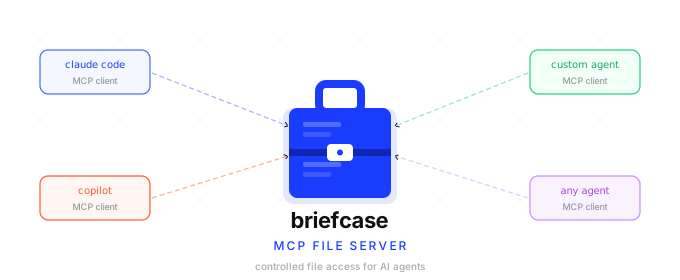
AI agents — such as Claude Code, GitHub Copilot, or any MCP-compatible client — typically only see files inside their current working directory. The Briefcase solves this by acting as a secure file courier: it exposes a curated set of directories to agents through a structured API, without ever revealing the underlying file origins.
You configure which directories to share. The Briefcase assigns each file a stable ID (a GUID). Agents work entirely through those IDs — they never see real paths, cannot traverse the directory tree, and cannot access anything outside what you explicitly shared.
Agents are able to search, read, create, and update the files made available through the Briefcase.
Video Demo
How It Works
  Your file system          The Briefcase MCP Server          AI Agent
  ──────────────           ───────────────────────────       ─────────
  C:\docs\notes.txt  ───►  briefcase://file/{guid}  ───►   list_files
  C:\docs\report.md  ───►  briefcase://file/{guid}  ───►   read_file
  D:\shared\data.csv ───►  briefcase://file/{guid}  ───►   (notifications)
                           briefcase://file/{guid}  ◄───   create_file / update_file
- You tell The Briefcase which directories to watch via the
BRIEFCASE_PATHSenvironment variable. - On startup, it scans those directories recursively and assigns each file a stable GUID.
- The GUID-to-path mapping is saved to
registry.jsonso IDs survive server restarts — agents can hold onto a file's ID indefinitely. - Agents call
list_filesto discover what's available andread_fileto retrieve content. - When files change on disk, The Briefcase sends MCP notifications so agents can react in real time.
Status
Version 1.3 — MVP using stdio and Local file system only.
Setup
Available Tools
See Tools Reference for full parameter and return-value details.
File Tools
list_files— discover all files known to The Briefcase; supports filtering by project, archive state, and sort orderread_file— retrieve a file's content by its GUIDcreate_file— write a new file into The Briefcaseupdate_file— replace the full content of an existing filesearch_files— search files by name, content, or both; supports archive filteringarchive_file— soft-hide a file from listings and searches; file remains readable by IDunarchive_file— restore an archived file to active status
Project Tools
create_project— create a named group for organizing fileslist_projects— list all projects with file countsget_project— get a project's metadata and its file listadd_file_to_project— associate a file with a projectremove_file_from_project— remove a file from a projectupdate_project— rename or re-describe a projectdelete_project— delete a project (files remain in The Briefcase)reindex_files— rebuild the file registry and search cache
File Change Notifications
The Briefcase watches configured directories in real time and sends standard MCP resource notifications when files are created, deleted, renamed, or modified. See Tools Reference for details.
Web Interface
The Briefcase also runs a local-only web UI (bound to 127.0.0.1, never reachable off-box) alongside the MCP server, letting a human browse the same files agents see. Open http://127.0.0.1:5289 (or your configured BRIEFCASE_WEB_PORT) to list files, view rendered Markdown, assign files to projects, and move or delete files. Move and delete are only available through the web UI — they are not exposed to agents, and delete sends files to the OS Recycle Bin/Trash rather than deleting them permanently.
The web UI's static assets require a published build (
dotnet publish) — see Setup. Running viadotnet runor a rawdotnet buildoutput serves the page but leaves it non-interactive.
Roadmap
- Search files by name and content
- Create file
- Update file content
- Projects — group files and filter by project
- Archive — soft-hide files from listings and searches
- Web interface — list, view, move, and delete files from a browser
- Plug in architecture for custom extensions
- Cloud storage backends (e.g. S3, OneDrive, Google Drive)
- HTTP with Server-Sent Events
License
Copyright 2026 Matthew Raffel. Licensed under the Apache License 2.0.
File Version
1.3.1
Installing The Briefcase
This server has no published package — it is built from source. Open the repository and follow its README.
▸ github.com/tatmanblue/the-briefcaseFAQ
Is The Briefcase MCP free?
Yes, The Briefcase MCP is free — one-click install via Unyly at no cost.
Does The Briefcase need an API key?
No, The Briefcase runs without API keys or environment variables.
Is The Briefcase hosted or self-hosted?
Self-hosted: the server runs locally on your machine via the install command above.
How do I install The Briefcase in Claude Desktop, Claude Code or Cursor?
Open The Briefcase on unyly.org, pick your client tab (Claude Desktop, Claude Code, Cursor) and press Install — the config is generated automatically, no JSON editing.
Related MCPs
Fetch
Web content fetching and conversion for efficient LLM usage.
AWS KB Retrieval
Retrieval from AWS Knowledge Base using Bedrock Agent Runtime.
 by modelcontextprotocol
Spring AI MCP Server
Provides auto-configuration for setting up an MCP server in Spring Boot applications.
llm-analysis-assistant
A very streamlined mcp client that supports calling and monitoring stdio/sse/streamableHttp, and can also view request responses through the /logs page. It also
 by xuzexin-hz
Compare The Briefcase with
Not sure what to pick?
Find your stack in 60 seconds
Author?
Embed badge for your README
Browse similar
All ai MCPs