
VÆR
FreeNot checkedProvides LLM-friendly weather tools and Norwegian place name resolution via MCP, enabling weather forecasts, air quality, marine conditions, and activity planni

About
Provides LLM-friendly weather tools and Norwegian place name resolution via MCP, enabling weather forecasts, air quality, marine conditions, and activity planning.
README

An opinionated Model Context Protocol (MCP) server that provides high-level, LLM-friendly weather tools backed by MET Norway’s Weather API (api.met.no), via an internal metno-proxy (Nginx reverse proxy + cache).
This server is designed to be used by MCP-compatible clients (e.g. AI assistants, IDEs, custom apps) to get structured weather information and simple “weather services” like activity planning and marine trip risk assessments.
Example Usage from a MCP Client
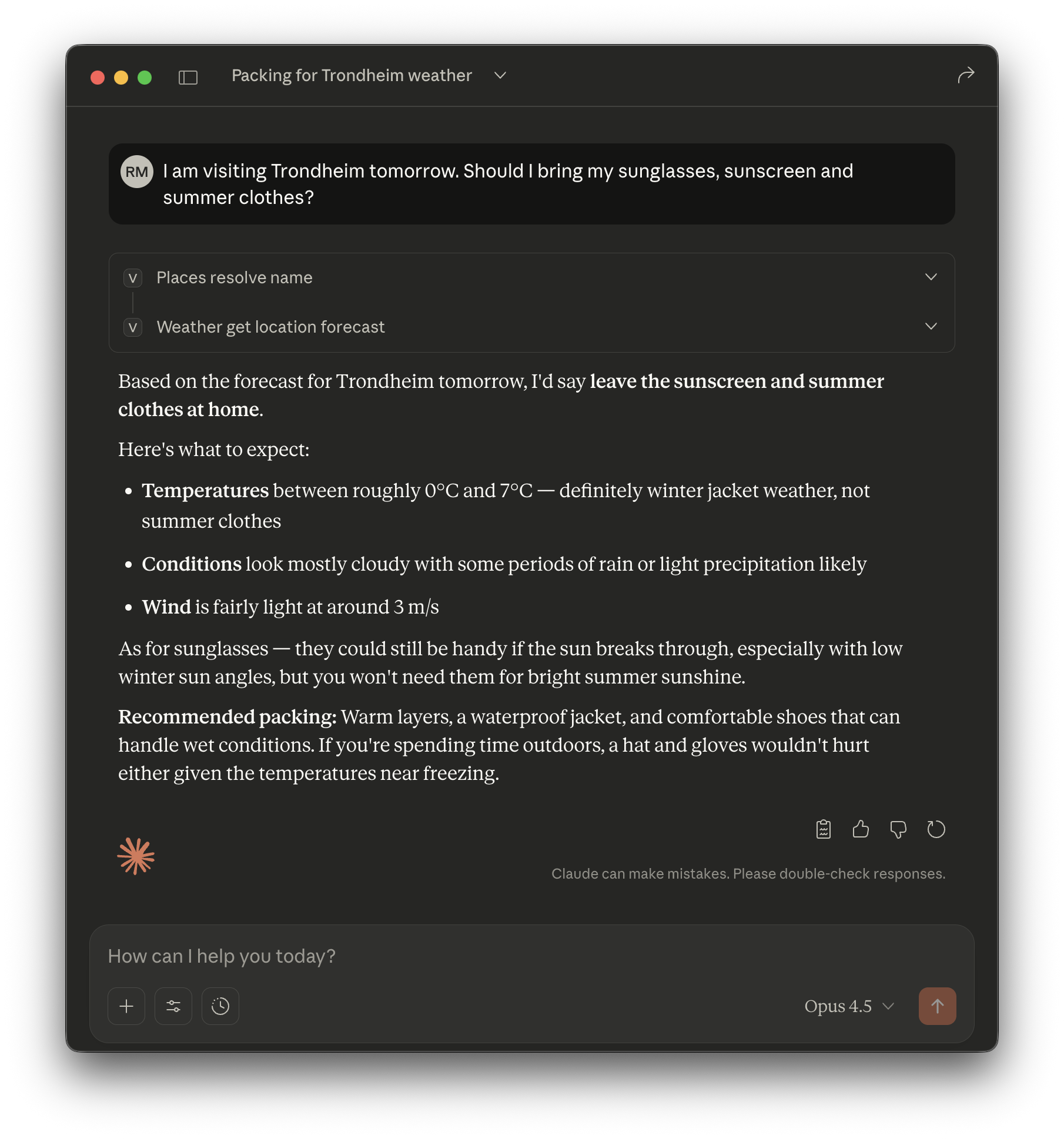
Getting Started
# Clone the repository
git clone [email protected]:bitjungle/vaer.git
# git clone https://github.com/bitjungle/vaer.git
cd vaer

# Start the stack (requires Docker)
make compose-build && make up

# Verify it's running
curl http://localhost:8080/healthz   # → ok
curl http://localhost:3000/health    # → {"status":"ok","transport":"http"}
That's it — you now have a running MCP server. See Documentation for next steps.
Features
Opinionated weather tools
weather_get_location_forecast– normalized hourly forecastweather_get_nowcast– short-term precipitation and conditionsweather_get_air_quality– air quality & AQI for Norwegian locationsweather_get_recent_observations– recent observed weather (Frost)weather_get_marine_conditions– coastal/marine summaryweather_assess_outdoor_activity_window– "when is it nice outside?"weather_assess_marine_trip_risk– simple marine risk evaluation
Norwegian place name resolution (28,115 places)
places_resolve_name– resolve Norwegian place names to coordinates- Powered by Kartverket Stedsnavn (official Norwegian place names register)
- Supports queries like "What's the weather in Bergen?"
- Intelligent matching with FTS5 full-text search, confidence scoring and disambiguation
- Local SQLite database (6.09 MB), ~5ms query latency
MCP-native
- Exposes tools, resources, and prompts using the MCP specification.
- Supports stdio and HTTP transports.
Backed by
metno-proxy- Uses your existing Nginx proxy for:
- Proper
User-Agenthandling (required by MET Norway) - Caching and rate limiting
- Health checks
- Proper
- Uses your existing Nginx proxy for:
Structured, consistent outputs
- Normalized units (°C, m/s, mm/h, etc.)
- Structured JSON-like responses + short textual summaries
- Includes metadata about data source, licensing and cache freshness
Attribution & compliance
- Built-in resources for MET Norway license & credit lines.
- Designed to respect MET usage guidelines.
Architecture
High-level architecture:
MCP Client (ChatGPT, IDE, custom app)
        │  (MCP / JSON-RPC)
        ▼
   Vær Server
        ├─ Weather Domain (MET-backed)
        │    │  (HTTP, internal)
        │    ▼
        │  metno-proxy (Nginx: cache, UA, rate limit)
        │    │  (HTTPS)
        │    ▼
        │  api.met.no (MET Norway Weather API)
        │
        └─ Places Domain (Norway gazetteer)
             │  (local SQLite query)
             ▼
           data/places.db (Stedsnavn-derived)
- The MCP server never calls
api.met.nodirectly. - All upstream traffic goes through
metno-proxy. - Place name resolution uses a local SQLite database (no network calls).
Requirements
Runtime
- Node.js 24+ (LTS or newer)
MET proxy
A running
metno-proxycontainer or service that:- Proxies
/weatherapi/...tohttps://api.met.no/... - Sets a compliant
User-Agent - Optionally enables caching & rate limiting
- Proxies
Docker + Compose v2 (for Docker deployments)
- macOS/Windows: Install Docker Desktop (includes everything)
- Linux servers: Install Docker CE from Docker's official repository — see docs/docker-linux.md
Places Database (included)
data/places.db(28,115 Norwegian places, 6.09 MB) is included in the repository- No setup required — works out of the box after
git clone - Developers can regenerate from source — see docs/etl-pipeline.md
MCP Client
- Any client that supports MCP servers over stdio or HTTP.
Configuration
The MCP server is configured via environment variables:
Required
METNO_PROXY_BASE_URLBase URL to the Nginx proxy (e.g.http://localhost:8080for dev,http://metno-proxy:80for Docker).
Proxy & Timeouts
METNO_TIMEOUT_MS— Upstream HTTP timeout (default:5000ms)METNO_CONNECT_TIMEOUT_MS— Connection timeout (default:2000ms)
Frost API (Observations)
FROST_CLIENT_ID— Client ID for Frost API (get from https://frost.met.no/auth/requestCredentials.html)FROST_BASE_URL— Override Frost API base URL (default:https://frost.met.no)FROST_TIMEOUT_MS— Frost API timeout (default:10000ms)
Server
VAER_PORT— Port for HTTP transport. If not set, server uses stdio transport.VAER_LOG_LEVEL— Logging level:debug,info,warn,error(default:info)
Authentication
VAER_AUTH_MODE— Authentication mode:none,api-key,jwt(default:none)VAER_API_KEY— API key value (required ifVAER_AUTH_MODE=api-key)
Places Database
PLACES_DB_PATH— Path to SQLite places database (default:./data/places.db)
Usage
Run
metno-proxyStart the Nginx-based proxy that frontsapi.met.no.Run the Vær server Start the MCP server process (via
node,npm,pnpm, or Docker), pointing it atMETNO_PROXY_BASE_URL.Connect from an MCP client Configure your MCP-compatible client to connect to this server:
- via stdio (local)
- or via HTTP (remote), using the configured port and optional API key.
Call tools from the client The client can now call any of the 7 implemented tools:
Data Tools:
weather_get_location_forecast– Global weather forecastsweather_get_nowcast– Nordic 2-hour precipitationweather_get_air_quality– Norway air quality & AQIweather_get_marine_conditions– Coastal marine weatherweather_get_recent_observations– Observed weather (Frost API)
Service Tools:
weather_assess_outdoor_activity_window– Activity planning with comfort scoringweather_assess_marine_trip_risk– Marine trip risk assessment
Places Tool:
places_resolve_name– Resolve Norwegian place names to coordinates
Repository Layout
.
├─ src/                       # TypeScript source code
│  ├─ index.ts               # MCP server entry point
│  ├─ tools/                 # 8 MCP tools (weather_* + places_*)
│  ├─ resources/             # MCP resources
│  ├─ prompts/               # MCP prompts
│  ├─ domain/                # Shared utilities
│  └─ places/                # Places module
├─ data/
│  └─ places.db              # Norwegian places database (included)
├─ docs/                      # Documentation
│  ├─ getting-started.md     # Deployment guide
│  ├─ development.md         # Developer setup
│  ├─ design.md              # Architecture & API specs
│  └─ ...                    # See docs/README.md
├─ metno-proxy/               # Nginx reverse proxy
├─ scripts/etl/               # Places ETL (developer-only)
├─ tests/                     # Test suites
├─ docker-compose.yml         # Full stack orchestration
└─ Makefile                   # Build commands
Quick Start (Development)
Prerequisites
- Node.js 24+ LTS
- Docker Desktop (macOS/Windows) or Docker + Compose v2 (Linux — see Requirements)
Running the Full Stack
# Build and start all services
make compose-build
make up

# Verify services are running
docker compose ps

# Test endpoints
curl http://localhost:8080/healthz
curl http://localhost:3000/health
Both services should show as "healthy":
- metno-proxy:
http://localhost:8080(nginx proxy to api.met.no) - vaer:
http://localhost:3000(MCP server with HTTP transport)
For detailed setup instructions, see docs/development.md.
Testing
# Run all tests
npm test

# Unit tests only
npm run test:unit

# Integration tests (requires metno-proxy running)
METNO_PROXY_BASE_URL=http://localhost:8080 npm run test:integration

# Test with MCP Inspector
npm run build
METNO_PROXY_BASE_URL=http://localhost:8080 npx @modelcontextprotocol/inspector node dist/index.js
For detailed testing instructions, see docs/development.md.
Deployment
The Vær server can be deployed in multiple ways:
Docker Compose (Recommended)
Deploy the full stack (metno-proxy + vaer) with a single command:
# 1. Build and start all services
make compose-build
make up

# 2. Verify deployment
docker compose ps
curl http://localhost:8080/healthz

# 3. View logs
make compose-logs

# 4. Stop services
make down
Environment Configuration:
Create a .env file in the project root:
# Required: Your User-Agent for MET Norway API
METNO_USER_AGENT=my-service/1.0 [email protected]

# Optional: Frost API credentials for observations
FROST_CLIENT_ID=your-frost-client-id

# Optional: Logging level
VAER_LOG_LEVEL=info
Standalone Docker
Build and run the MCP server image directly:
# Build image
docker build -t vaer:latest .

# Run with environment variables
docker run -d \
  --name vaer \
  -e METNO_PROXY_BASE_URL=http://metno-proxy:80 \
  -e VAER_LOG_LEVEL=info \
  vaer:latest
Note: The places.db database is baked into the image during build. Do not mount ./data as a volume — it causes permission issues.
MCP Client Configuration
Connect MCP clients (Claude Desktop, VS Code, etc.) to the server:
Claude Desktop (~/Library/Application Support/Claude/claude_desktop_config.json):
{
  "mcpServers": {
    "vaer": {
      "command": "node",
      "args": ["/path/to/vaer/dist/index.js"],
      "env": {
        "METNO_PROXY_BASE_URL": "http://localhost:8080"
      }
    }
  }
}
Docker-based setup:
{
  "mcpServers": {
    "vaer": {
      "command": "docker",
      "args": [
        "run", "--rm", "-i",
        "--network", "vaer_vaer-network",
        "-e", "METNO_PROXY_BASE_URL=http://metno-proxy:80",
        "vaer:latest"
      ]
    }
  }
}
See examples/client-configs/ for more configuration examples.
Production Deployment
For production deployments, see docs/getting-started.md:
- Docker Compose production configuration
- Kubernetes manifests
- Security considerations
- Monitoring & operations
Documentation
| Guide | Description |
|---|---|
| Getting Started | Production deployment guide |
| Development | Local setup, testing, contributing |
| Design | Architecture, API schemas, tool specifications |
| Docker on Linux | Installing Docker CE on Ubuntu/Debian |
| Metno Proxy | Nginx proxy configuration |
| Observability | Metrics, logging, debugging |
| ETL Pipeline | Regenerating places.db (developer-only) |
| History | Implementation history |
| Roadmap | Future plans |
See docs/README.md for the complete documentation index.
License
VÆR is open-source software licensed under the MIT License. However, the author respectfully requests that it not be used for military, warfare, or surveillance applications.
Installing VÆR
This server has no published package — it is built from source. Open the repository and follow its README.
▸ github.com/bitjungle/vaerFAQ
Is VÆR MCP free?
Yes, VÆR MCP is free — one-click install via Unyly at no cost.
Does VÆR need an API key?
No, VÆR runs without API keys or environment variables.
Is VÆR hosted or self-hosted?
Self-hosted: the server runs locally on your machine via the install command above.
How do I install VÆR in Claude Desktop, Claude Code or Cursor?
Open VÆR on unyly.org, pick your client tab (Claude Desktop, Claude Code, Cursor) and press Install — the config is generated automatically, no JSON editing.
Related MCPs
Fetch
Web content fetching and conversion for efficient LLM usage.
AWS KB Retrieval
Retrieval from AWS Knowledge Base using Bedrock Agent Runtime.
 by modelcontextprotocol
Spring AI MCP Server
Provides auto-configuration for setting up an MCP server in Spring Boot applications.
llm-analysis-assistant
A very streamlined mcp client that supports calling and monitoring stdio/sse/streamableHttp, and can also view request responses through the /logs page. It also
 by xuzexin-hz
Compare VÆR with
Not sure what to pick?
Find your stack in 60 seconds
Author?
Embed badge for your README
Browse similar
All ai MCPs