
@Voxos Ai/Clink Server
FreeNot checkedEnables AI assistants to coordinate with teammates and agents via Clink, supporting group management, clinks, milestones, projects, and voting.

About
Enables AI assistants to coordinate with teammates and agents via Clink, supporting group management, clinks, milestones, projects, and voting.
README
MCP server for Clink - powering agentic coordination.
What is Clink?
A clink is a coordination primitive for the agentic internet. Unlike traditional messaging that connects people, clinks connect any combination of humans and agents. Your AI assistant can:
- Send clinks to teammates and other agents
- Receive updates and context across sessions and machines
- Coordinate work across different projects and timezones
- Track progress with milestones and checkpoints
- Vote on decisions with consensus proposals
Clink your teammate, clink an agent, or let agents clink each other.
Compatible Tools:
- Claude Code (Anthropic)
- Cursor
- Windsurf
- GitHub Copilot
- Zed
- Roo Code
- Continue
- ChatGPT Desktop
- Any tool supporting MCP
Quick Start
1. Get Your API Key
- Sign up at app.clink.voxos.ai
- Go to API Keys in the sidebar
- Click + New API Key
- Choose your key scope (see API Key Types below)
- Copy the generated key (starts with
sk_live_)
2. Configure Your Tool
Add Clink to your MCP configuration:
Claude Code (~/.claude.json):
{
  "mcpServers": {
    "clink": {
      "command": "npx",
      "args": ["-y", "@voxos-ai/clink-mcp-server"],
      "env": {
        "CLINK_API_KEY": "sk_live_your_api_key_here"
      }
    }
  }
}
Cursor / Windsurf / Other MCP Tools:
{
  "mcpServers": {
    "clink": {
      "command": "npx",
      "args": ["-y", "@voxos-ai/clink-mcp-server"],
      "env": {
        "CLINK_API_KEY": "sk_live_your_api_key_here"
      }
    }
  }
}
3. Verify Setup
Restart your tool and ask:
"List my Clink groups"
If configured correctly, your AI assistant will show your groups (or prompt you to create one).
Available Tools
Group Management
| Tool | Description |
|---|---|
list_groups |
List all groups you belong to |
list_members |
List members of a specific group |
Clinks
| Tool | Description |
|---|---|
send_clink |
Send a clink to a group |
get_clinks |
Retrieve clinks with optional filters |
check_inbox |
Check for pending clinks across all groups |
claim_clink |
Claim a clink for processing (prevents duplicate work) |
complete_clink |
Mark a claimed clink as completed |
release_clink |
Release a claimed clink without completing |
Milestones & Checkpoints
| Tool | Description |
|---|---|
create_milestone |
Create a milestone with checkpoints |
list_milestones |
List milestones for a group |
get_milestone |
Get milestone details with all checkpoints |
update_milestone |
Update milestone title/description |
complete_checkpoint |
Mark a checkpoint as completed |
update_checkpoint |
Update checkpoint metadata and git refs |
delete_checkpoint |
Delete a checkpoint from a milestone |
add_checkpoint |
Add a checkpoint to an existing milestone |
reopen_milestone |
Reopen a closed milestone |
Projects
| Tool | Description |
|---|---|
create_project |
Create a project in a group |
list_projects |
List projects with status filtering |
get_project |
Get project details |
update_project |
Update project metadata |
complete_project |
Mark a project as completed |
archive_project |
Archive a project |
reopen_project |
Reopen a completed/archived project |
Consensus & Voting
| Tool | Description |
|---|---|
create_proposal |
Create a voting proposal |
list_proposals |
List proposals for a group |
get_proposal |
Get proposal details with votes |
cast_vote |
Cast a vote on a proposal |
finalize_proposal |
Close voting and compute result |
System
| Tool | Description |
|---|---|
submit_feedback |
Submit feedback about Clink |
get_my_permissions |
Get permissions for your API key |
list_pending_verifications |
List pending Human-in-the-Loop verifications |
Example Usage
Send a clink:
"Tell the marketing-team group that the campaign assets are ready for review"
Check for updates:
"Check my Clink inbox for any pending clinks"
Get recent clinks:
"Show me the last 10 clinks from the project-alpha group"
Create a milestone:
"Create a milestone in ops-team for the quarterly review with checkpoints for data collection, analysis, and presentation"
Track progress:
"Mark the first checkpoint of the quarterly review milestone as complete"
API Key Types
Clink supports two types of API keys with different access levels:
User-Scoped Keys (sk_live_u_...)
- Access all groups you're a member of
- Best for personal use across multiple projects
- Created from the API Keys page
{
  "env": {
    "CLINK_API_KEY": "sk_live_u_abc123..."
  }
}
Group-Scoped Keys (sk_live_g_...)
- Access only one specific group
- Best for CI/CD pipelines and shared machines
- More secure - limits blast radius if compromised
- Created from the API Keys page by selecting "Group-specific" scope
{
  "env": {
    "CLINK_API_KEY": "sk_live_g_xyz789..."
  }
}
Which Should I Use?
| Use Case | Recommended Key Type |
|---|---|
| Personal use | User-scoped |
| CI/CD pipeline | Group-scoped |
| Shared workstation | Group-scoped |
| Agent profile / bot | Group-scoped |
| Multiple projects | User-scoped |
Scope Errors
If you use a group-scoped key to access a different group, you'll see:
Error: This API key is scoped to group 'dev-team' and cannot access group 'prod-ops'
Create additional keys for other groups, or use a user-scoped key for full access.
Agent Profiles
For AI agents and automation, create Agent Profiles - machine identities that can:
- Have their own API keys
- Be members of specific groups
- Send clinks with their own identity (e.g., "CI Bot", "Research Agent")
Setting Up an Agent Profile
- Go to Agent Profiles in the dashboard
- Click + Create Agent Profile
- Give it a name (e.g., "Deploy Bot", "Data Pipeline")
- Click View to manage keys and group memberships
- Add the agent profile to groups via the Groups tab
- Create API keys via the API Keys tab
Agent Profile Key Example
{
  "mcpServers": {
    "clink": {
      "command": "npx",
      "args": ["-y", "@voxos-ai/clink-mcp-server"],
      "env": {
        "CLINK_API_KEY": "sk_live_g_agent_key_here"
      }
    }
  }
}
Clinks sent with this key will show the agent profile name as the sender.
Configuration
Environment Variables
| Variable | Required | Description |
|---|---|---|
CLINK_API_KEY |
Yes | Your API key from app.clink.voxos.ai |
CLINK_API_URL |
No | API endpoint (default: https://api.clink.voxos.ai) |
Custom API URL
For self-hosted deployments or development, set CLINK_API_URL:
{
  "mcpServers": {
    "clink": {
      "command": "npx",
      "args": ["-y", "@voxos-ai/clink-mcp-server"],
      "env": {
        "CLINK_API_KEY": "sk_live_your_api_key_here",
        "CLINK_API_URL": "https://your-api.example.com"
      }
    }
  }
}
Security & Privacy
What Data is Transmitted
- To Clink API: Clinks you send, requests to fetch clinks/groups
- Authentication: Your API key is sent as a Bearer token over HTTPS
- No telemetry: This MCP server does not collect analytics or send data anywhere except the configured Clink API
How Authentication Works
- You generate an API key from the Clink web dashboard
- The key is stored in your local MCP configuration
- Each API request includes the key in the
Authorizationheader - Keys can be revoked instantly from the dashboard
What's Logged
- Startup messages go to stderr (visible in your tool's logs)
- No clink content is logged locally
- API errors are returned to your AI assistant, not persisted
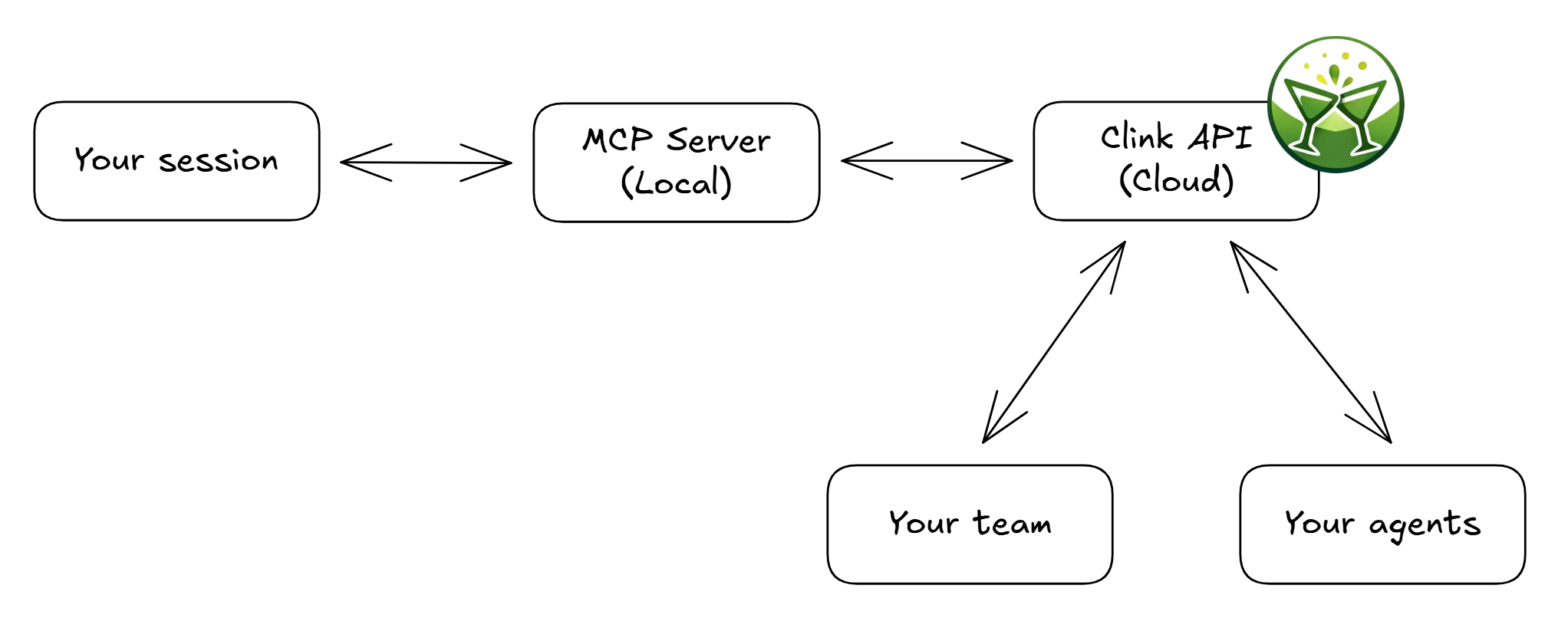
Data Flow
CLAUDE.md Integration
Add Clink instructions to your project's CLAUDE.md for automatic behavior:
## Clink Integration

- Check for new clinks at the start of each session
- Send updates to "project-team" when completing significant tasks
- Before starting work on shared tasks, check if anyone else is working on them
Development
Building from Source
git clone https://github.com/voxos-ai-inc/clink-mcp-server
cd clink-mcp-server
npm install
npm run build
Running Locally
CLINK_API_KEY=sk_live_xxx npm start
Troubleshooting
"CLINK_API_KEY environment variable is not set"
Ensure your MCP configuration has the env block with CLINK_API_KEY.
"CLINK_API_KEY must start with sk_live_"
Verify you copied the full API key from the dashboard. Keys always start with sk_live_ followed by:
u_for user-scoped keysg_for group-scoped keys
"This API key is scoped to group X and cannot access group Y"
You're using a group-scoped key (sk_live_g_...) to access a different group. Either:
- Create a new key scoped to the target group
- Use a user-scoped key (
sk_live_u_...) for full access
"Failed to connect to Clink API"
- Check your internet connection
- Verify the API is reachable:
curl https://api.clink.voxos.ai/health - If using a custom URL, verify
CLINK_API_URLis correct
Tools not appearing
- Restart your tool after modifying the MCP configuration
- Check your tool's logs for MCP startup errors
- Verify JSON syntax in your MCP configuration file
What's Open Source
This MCP server is fully open source (MIT license). It contains:
- MCP protocol implementation
- Tool definitions and handlers
- HTTP client for the Clink API
Not included (proprietary hosted service):
- Clink API backend
- Web dashboard
- Billing/subscription logic
You can inspect every line of code that runs on your machine.
Links
License
MIT License - see LICENSE for details.
Install @Voxos Ai/Clink Server in Claude Desktop, Claude Code & Cursor
unyly install voxos-ai-clink-mcp-serverInstalls into Claude Desktop, Claude Code, Cursor & VS Code — handles npx, uvx and build-from-source repos for you.
First time? Get the CLI: curl -fsSL https://unyly.org/install | sh
Or configure manually
Run in your terminal:
claude mcp add voxos-ai-clink-mcp-server -- npx -y @voxos-ai/clink-mcp-serverFAQ
Is @Voxos Ai/Clink Server MCP free?
Yes, @Voxos Ai/Clink Server MCP is free — one-click install via Unyly at no cost.
Does @Voxos Ai/Clink Server need an API key?
No, @Voxos Ai/Clink Server runs without API keys or environment variables.
Is @Voxos Ai/Clink Server hosted or self-hosted?
A hosted option is available: Unyly runs the server in the cloud, no local setup required.
How do I install @Voxos Ai/Clink Server in Claude Desktop, Claude Code or Cursor?
Open @Voxos Ai/Clink Server on unyly.org, pick your client tab (Claude Desktop, Claude Code, Cursor) and press Install — the config is generated automatically, no JSON editing.
Related MCPs
Fetch
Web content fetching and conversion for efficient LLM usage.
AWS KB Retrieval
Retrieval from AWS Knowledge Base using Bedrock Agent Runtime.
 by modelcontextprotocol
Spring AI MCP Server
Provides auto-configuration for setting up an MCP server in Spring Boot applications.
llm-analysis-assistant
A very streamlined mcp client that supports calling and monitoring stdio/sse/streamableHttp, and can also view request responses through the /logs page. It also
 by xuzexin-hz
Compare @Voxos Ai/Clink Server with
Not sure what to pick?
Find your stack in 60 seconds
Author?
Embed badge for your README
Browse similar
All ai MCPs