
Win Toast
FreeNot checkedAn MCP server that lets AI assistants send Windows toast notifications and dialog boxes

About
An MCP server that lets AI assistants send Windows toast notifications and dialog boxes
README
An MCP (Model Context Protocol) server that lets AI assistants send Windows toast notifications and dialog boxes. Give your AI a voice on your desktop.
Why mcp-win-toast?
AI assistants are powerful — but they work silently in the background. With mcp-win-toast, your AI can actively notify you through native Windows UI, turning it into a true desktop companion.
Use Cases
Long Task Completion Alert
Ask the AI to analyze a large codebase, generate a report, or run a complex workflow — and get a toast notification the moment it's done. No need to keep watching the screen.
"Refactor all the API endpoints, and notify me when you're finished."
Scheduled Reminders
Combine with other MCP tools to set up reminders that pop up as native Windows notifications.
"Remind me in 30 minutes to check the deployment status."
Build & Test Result Notifications
Let the AI run your build pipeline or test suite and push the result as a toast — pass or fail, you'll know right away.
"Run the tests and show me a toast with the results."
Important Decision Checkpoints
Use dialog boxes to force a pause and get explicit user confirmation before the AI proceeds with a critical action.
"Before deleting any files, show me a dialog to confirm."
System Monitoring Alerts
Have the AI periodically check disk space, CPU usage, or service health, and alert you only when something needs attention.
"Monitor my disk space and warn me if it drops below 10GB."
Tools
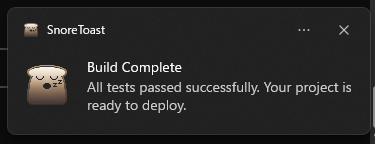
show_toast
Displays a Windows toast notification.
| Parameter | Type | Description |
|---|---|---|
| title | string | Notification title |
| message | string | Notification body text |
show_dialog
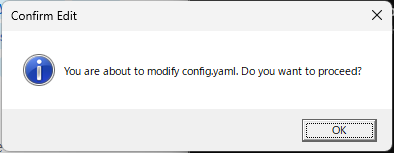
Displays a standard Windows dialog box with an OK button. Execution is blocked until the user clicks OK, making it ideal for confirmations and important alerts.
| Parameter | Type | Description |
|---|---|---|
| title | string | Dialog title |
| message | string | Dialog body text |
Setup
git clone https://github.com/ShigeruWakida/mcp-win-toast.git
cd mcp-win-toast
npm install
npm run build
Claude Desktop Configuration
Add the following to your claude_desktop_config.json:
{
  "mcpServers": {
    "win-toast": {
      "command": "node",
      "args": ["C:\\path\\to\\mcp-win-toast\\build\\index.js"]
    }
  }
}
Combo: mcp-win-toast + YakusokuKeeper
YakusokuKeeper is an MCP server that enforces rules on Claude's behavior based on time, input count, or first interaction. By combining it with mcp-win-toast, you can build a self-managing AI assistant that notifies you at the right moments — automatically, without being asked.
Break Reminder
Add a time-based rule in YakusokuKeeper to remind you to take a break every 30 minutes, delivered as a toast notification.
YakusokuKeeper rule:
time_based:
  - rule: "Call show_toast with title 'Break Time' and message 'You have been working for 30 minutes. Stand up and stretch!'"
    minutes: 30
Progress Report at Regular Intervals
Have Claude automatically summarize what it has done every 10 interactions and notify you.
YakusokuKeeper rule:
input_count:
  - rule: "Summarize what you have accomplished so far in 2-3 bullet points, then call show_toast with title 'Progress Report' and the summary as the message."
    count: 10
Welcome Briefing on Session Start
Greet the user with a toast notification and a quick status overview at the beginning of every session.
YakusokuKeeper rule:
first_time:
  - rule: "Call show_toast with title 'Session Started' and message 'Hello! Ready to assist you. Let me know what you need.' as a greeting."
Critical File Protection
Show a blocking dialog for confirmation whenever Claude is about to modify important files.
YakusokuKeeper rule:
first_time:
  - rule: "Before editing any file matching *.env, *.config, or docker-compose.*, always call show_dialog with title 'Confirm Edit' and a message describing which file you are about to modify. Wait for the user to acknowledge before proceeding."
Session Duration Warning
Warn the user with a dialog box after a long session so they can decide whether to continue.
YakusokuKeeper rule:
time_based:
  - rule: "Call show_dialog with title 'Long Session' and message 'You have been working for over an hour. Would you like to wrap up or continue?' to check in with the user."
    minutes: 60
Prompt Examples for Claude Code
You can also give these instructions directly as prompts in Claude Code:
Every time you finish a task, send me a toast notification with a brief summary.
If you are about to delete or overwrite any file, show a dialog box to confirm before proceeding.
After every 5 messages, show a toast with a short progress update of what we have accomplished.
Requirements
- Windows 10 / 11
- Node.js 18+
License
ISC
Installing Win Toast
This server has no published package — it is built from source. Open the repository and follow its README.
▸ github.com/ShigeruWakida/mcp-win-toastFAQ
Is Win Toast MCP free?
Yes, Win Toast MCP is free — one-click install via Unyly at no cost.
Does Win Toast need an API key?
No, Win Toast runs without API keys or environment variables.
Is Win Toast hosted or self-hosted?
Self-hosted: the server runs locally on your machine via the install command above.
How do I install Win Toast in Claude Desktop, Claude Code or Cursor?
Open Win Toast on unyly.org, pick your client tab (Claude Desktop, Claude Code, Cursor) and press Install — the config is generated automatically, no JSON editing.
Related MCPs
Fetch
Web content fetching and conversion for efficient LLM usage.
AWS KB Retrieval
Retrieval from AWS Knowledge Base using Bedrock Agent Runtime.
 by modelcontextprotocol
Spring AI MCP Server
Provides auto-configuration for setting up an MCP server in Spring Boot applications.
llm-analysis-assistant
A very streamlined mcp client that supports calling and monitoring stdio/sse/streamableHttp, and can also view request responses through the /logs page. It also
 by xuzexin-hz
Compare Win Toast with
Not sure what to pick?
Find your stack in 60 seconds
Author?
Embed badge for your README
Browse similar
All ai MCPs