
Zed Mcp Server Threadbridge
FreeNot checkedModel Context Protocol Server for persistent AI memory with hybrid semantic search on Zed

About
Model Context Protocol Server for persistent AI memory with hybrid semantic search on Zed
README
A Zed extension that provides persistent AI memory through the Model Context Protocol.
ThreadBridge remembers context across conversations using hybrid semantic search (Arctic Embed + BM25 + RRF) with a cognitive decay model (BLL).
Retrieval Benchmark
Runs entirely on local CPU with zero cloud dependency.
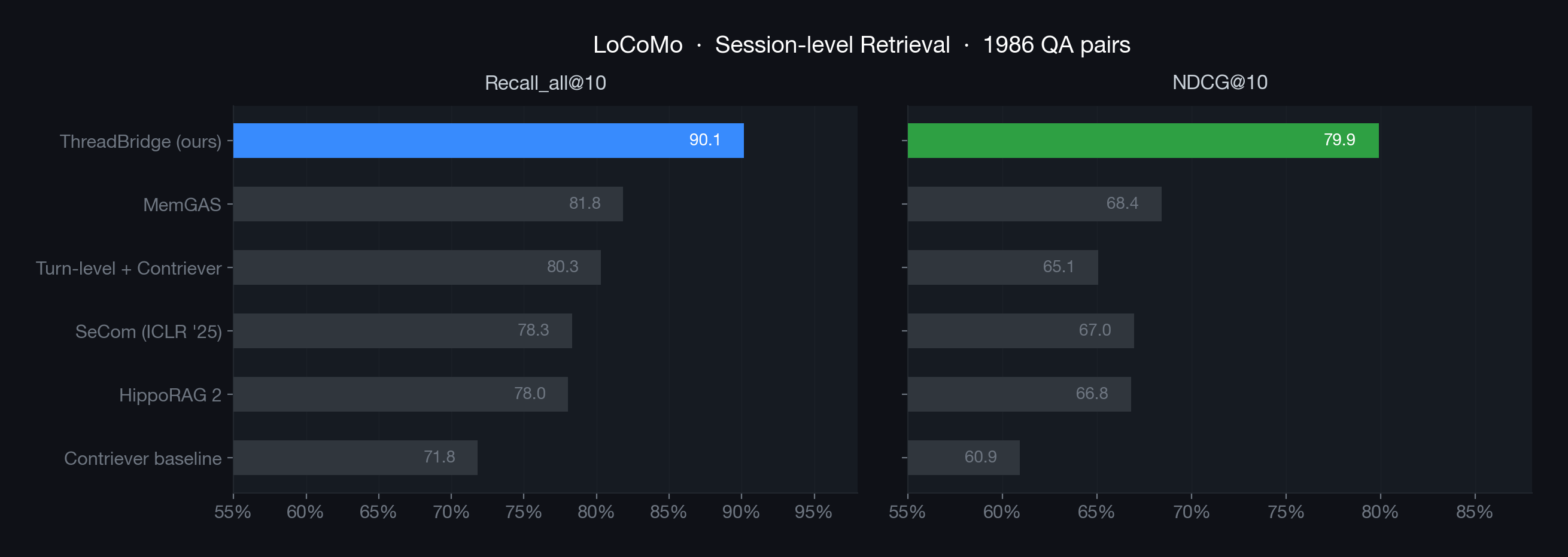
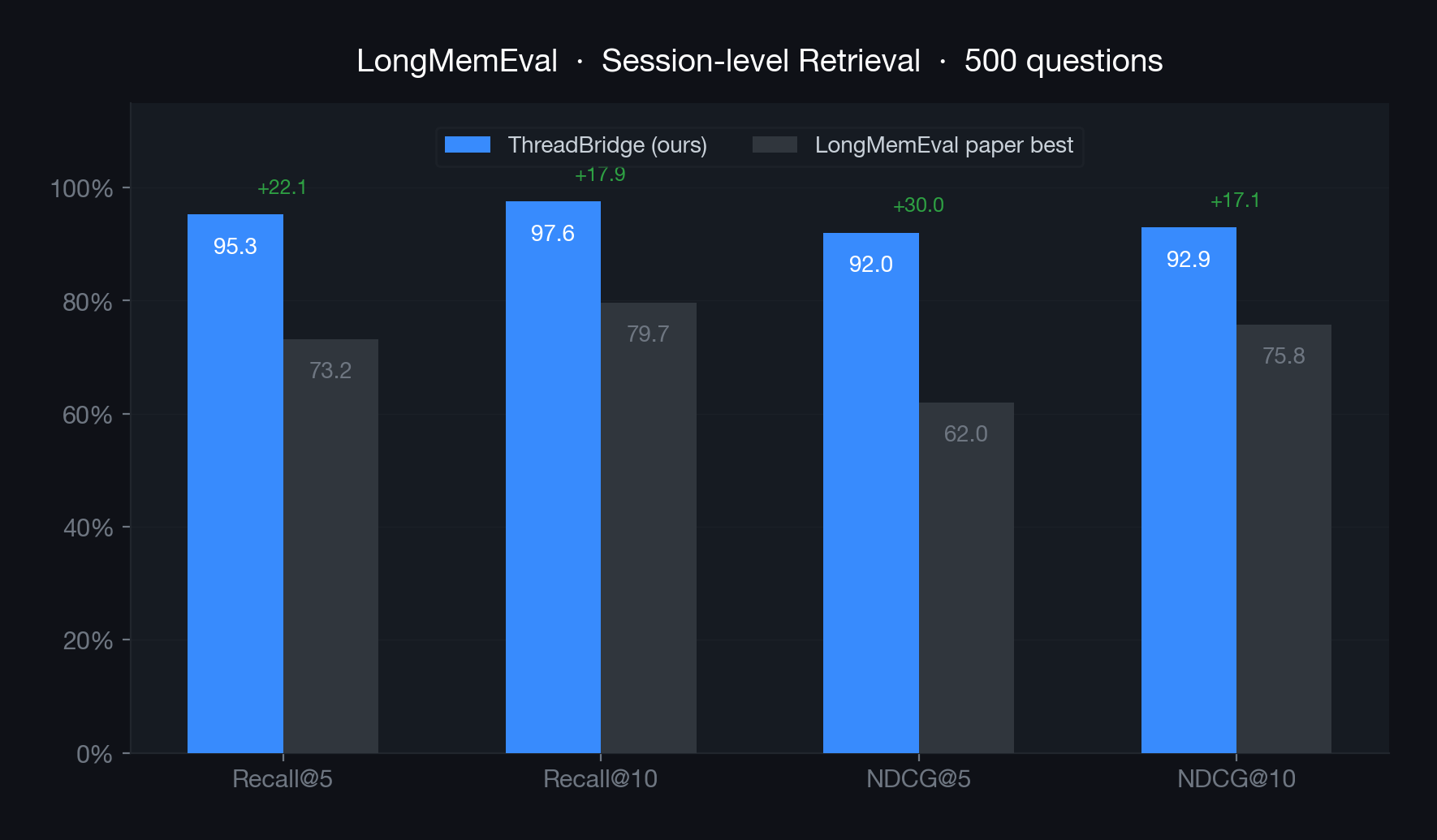
Config: Arctic Embed M (768d) + BM25 hybrid + RRF fusion + BLL reranker (30%). Top-20, threshold 0.15.
LoCoMo (Session-level, 1986 QA pairs)
LongMemEval (Session-level, 500 questions)
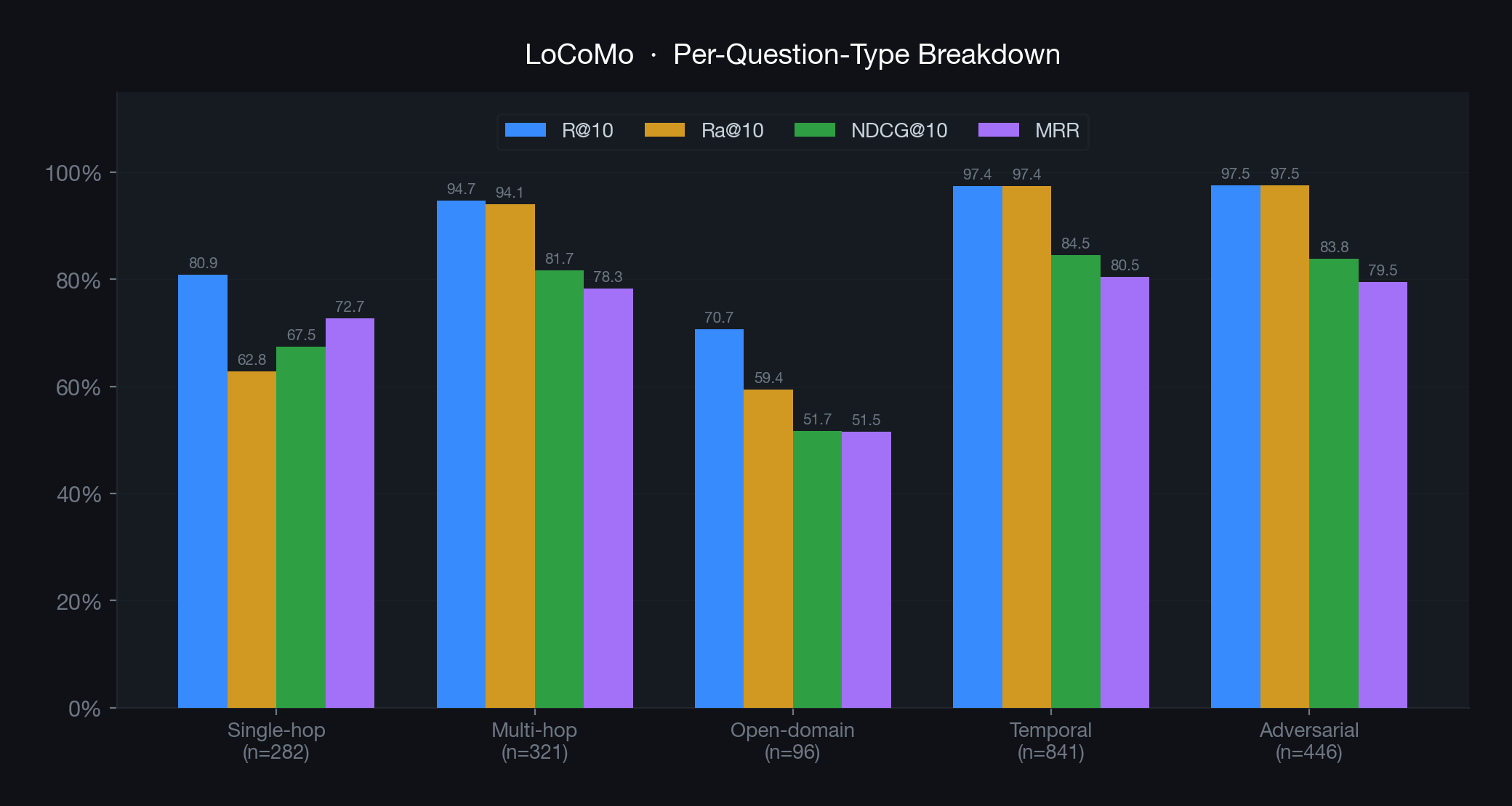
Per-question-type breakdown (LoCoMo)
Metric definitions
- Recall@K (fractional): fraction of correct sessions retrieved in top-K unique sessions. Standard IR recall.
- Recall_all@K (Ra@K): binary — 1.0 iff all correct sessions are in top-K, else 0.0. Used by MemGAS for direct comparability.
- NDCG@K: normalized discounted cumulative gain at session level.
- MRR: mean reciprocal rank of first correct session.
Notes
- LoCoMo dataset contains 10 conversations / 1986 QA pairs (Maharana et al. 2024).
- Baseline numbers from MemGAS Table 2&3 (recall_all definition confirmed via source code).
- LongMemEval baseline from Table 2&3 (ICLR 2025), using Stella V5 + dense retrieval.
- ThreadBridge reports both recall variants for transparency. The
Ra@10column is directly comparable to MemGAS. - End-to-end LLM-Judge scores (Hindsight, MemR3, Zep, Mem0) evaluate a different pipeline and are not comparable to retrieval-layer metrics.
Installation
From Extension Marketplace
- Open Zed
- Go to Extensions (cmd+shift+x)
- Search for "ThreadBridge"
- Click Install
ThreadBridge is now available in the Zed Extension Marketplace. The extension will automatically download the appropriate binary for your platform.
Local Installation (Dev)
Dev extensions are compiled locally by Zed, so this installation method requires Rust via rustup. Rust is not required when installing ThreadBridge from the Zed Extension Marketplace.
Clone this repository:
git clone https://github.com/dereklei12/zed-mcp-server-threadbridge.gitIn Zed, open the command palette (cmd+shift+p) and run zed: install dev extension, then select the cloned directory.
The extension will automatically download the
mcp-threadbridgebinary from GitHub Releases on first use.
MCP Tools
| Tool | Description |
|---|---|
load_thread |
Load saved conversation context for a project |
save_thread |
Save current conversation context |
search_memory |
Semantic search across project memory |
Configuration
Optional settings in Zed:
project_path— project directory for memory storage (default: current working directory)storage— where to store thread data:"true"(default): local, at<project_path>/.threadbridge/"false": global, at~/.threadbridge/projects/- absolute path: custom location
Supported Platforms
- macOS (Apple Silicon)
- Linux (x86_64)
- Windows (x86_64)
License
MIT
Installing Zed Mcp Server Threadbridge
This server has no published package — it is built from source. Open the repository and follow its README.
▸ github.com/dereklei12/zed-mcp-server-threadbridgeFAQ
Is Zed Mcp Server Threadbridge MCP free?
Yes, Zed Mcp Server Threadbridge MCP is free — one-click install via Unyly at no cost.
Does Zed Mcp Server Threadbridge need an API key?
No, Zed Mcp Server Threadbridge runs without API keys or environment variables.
Is Zed Mcp Server Threadbridge hosted or self-hosted?
Self-hosted: the server runs locally on your machine via the install command above.
How do I install Zed Mcp Server Threadbridge in Claude Desktop, Claude Code or Cursor?
Open Zed Mcp Server Threadbridge on unyly.org, pick your client tab (Claude Desktop, Claude Code, Cursor) and press Install — the config is generated automatically, no JSON editing.
Related MCPs
Fetch
Web content fetching and conversion for efficient LLM usage.
AWS KB Retrieval
Retrieval from AWS Knowledge Base using Bedrock Agent Runtime.
 by modelcontextprotocol
Spring AI MCP Server
Provides auto-configuration for setting up an MCP server in Spring Boot applications.
llm-analysis-assistant
A very streamlined mcp client that supports calling and monitoring stdio/sse/streamableHttp, and can also view request responses through the /logs page. It also
 by xuzexin-hz
Compare Zed Mcp Server Threadbridge with
Not sure what to pick?
Find your stack in 60 seconds
Author?
Embed badge for your README
Browse similar
All ai MCPs