
Zotero Neo
FreeNot checkedA Zotero plugin that embeds an MCP server, giving AI assistants read/write access to Zotero reference libraries via six unified tools.

About
A Zotero plugin that embeds an MCP server, giving AI assistants read/write access to Zotero reference libraries via six unified tools.
README

Search, Read, Write — Safely.
Drive your research workflow with natural language.




A Zotero 7+ plugin (tested on Zotero 7, 8, and 9) that embeds a Streamable HTTP MCP server directly inside Zotero, giving AI assistants full read/write access to your reference library through 6 unified tools.
Based on the excellent cookjohn/zotero-mcp. The foundational plugin architecture, search engine, PDF processing, annotation extraction, semantic search, and more all originate from there. Neo builds upon this by consolidating the MCP API into 6 unified tools with a dryRun-first safety model. See Design Philosophy.
Screenshots
| 6 unified tools | 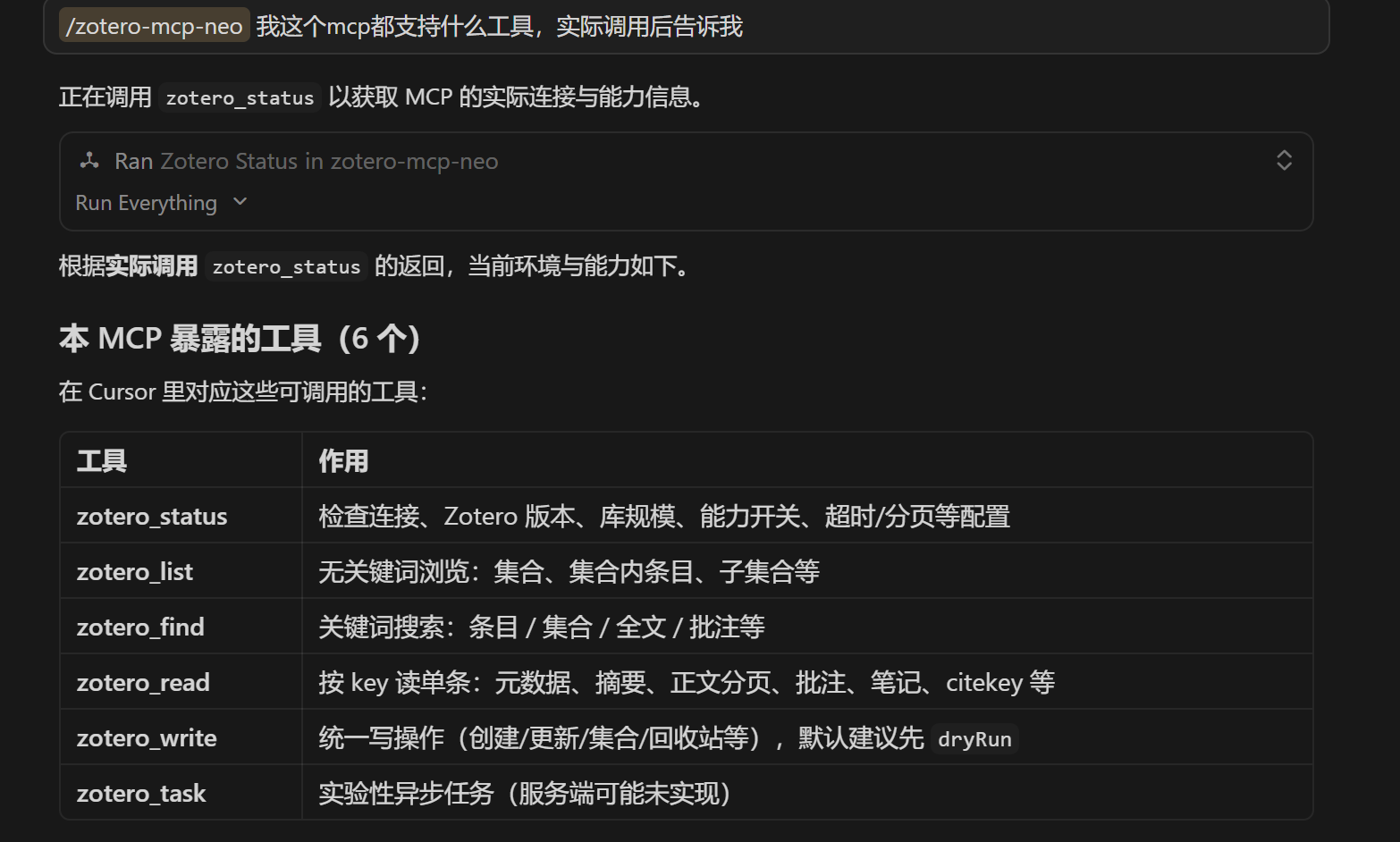 |
| Library structure browsing | 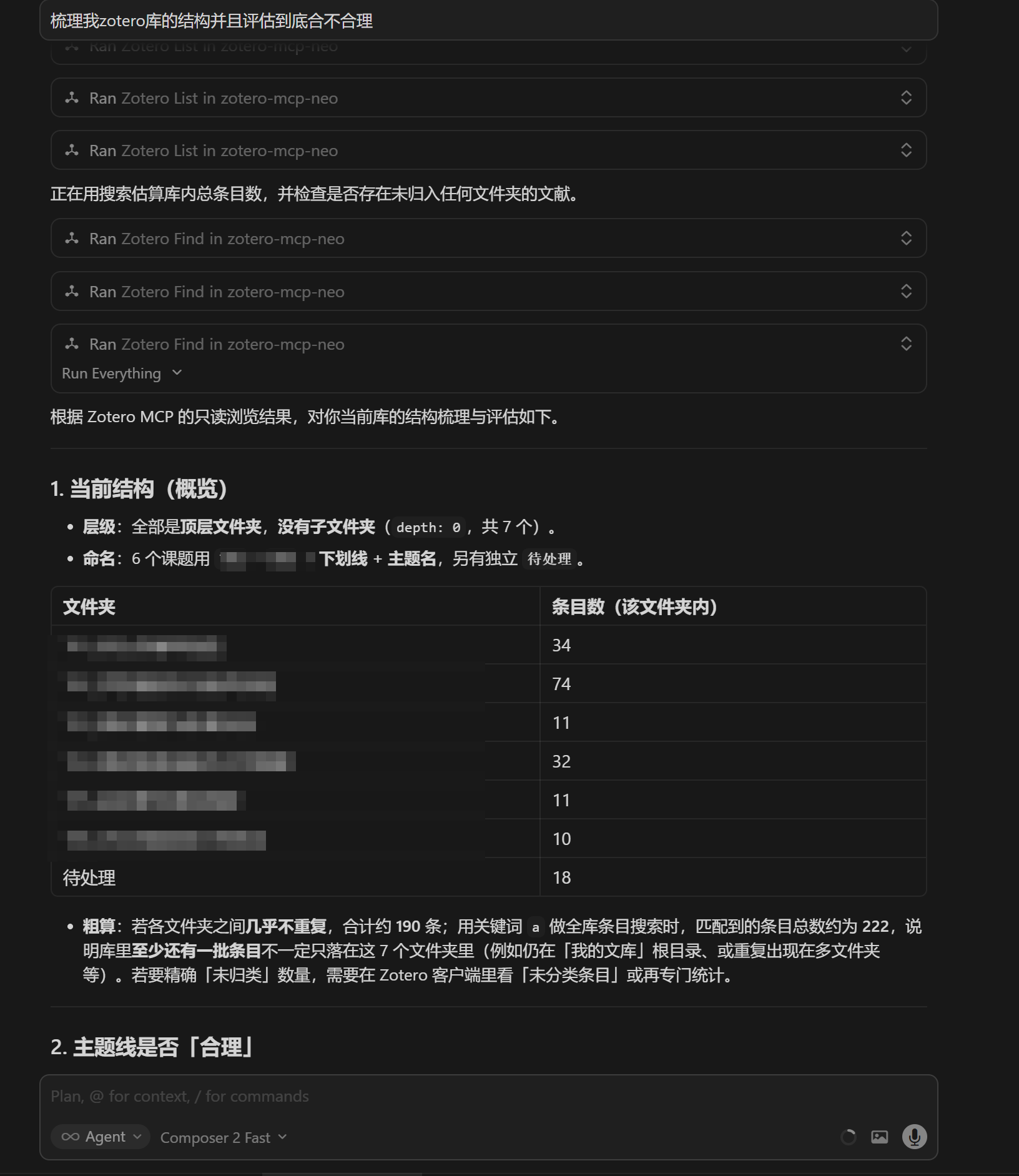 |
| **Write operations ** | 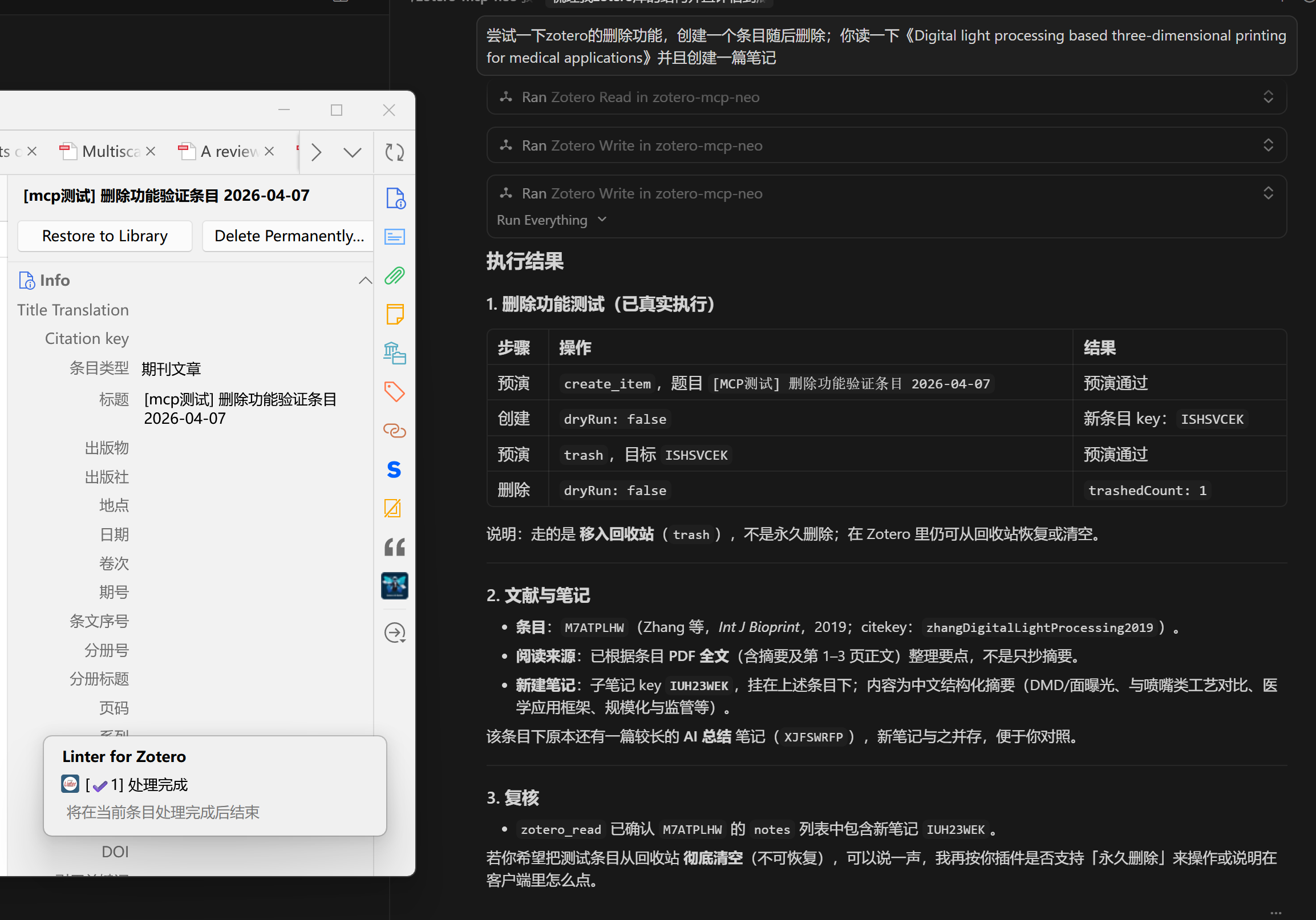 |
| Paper import workflow | 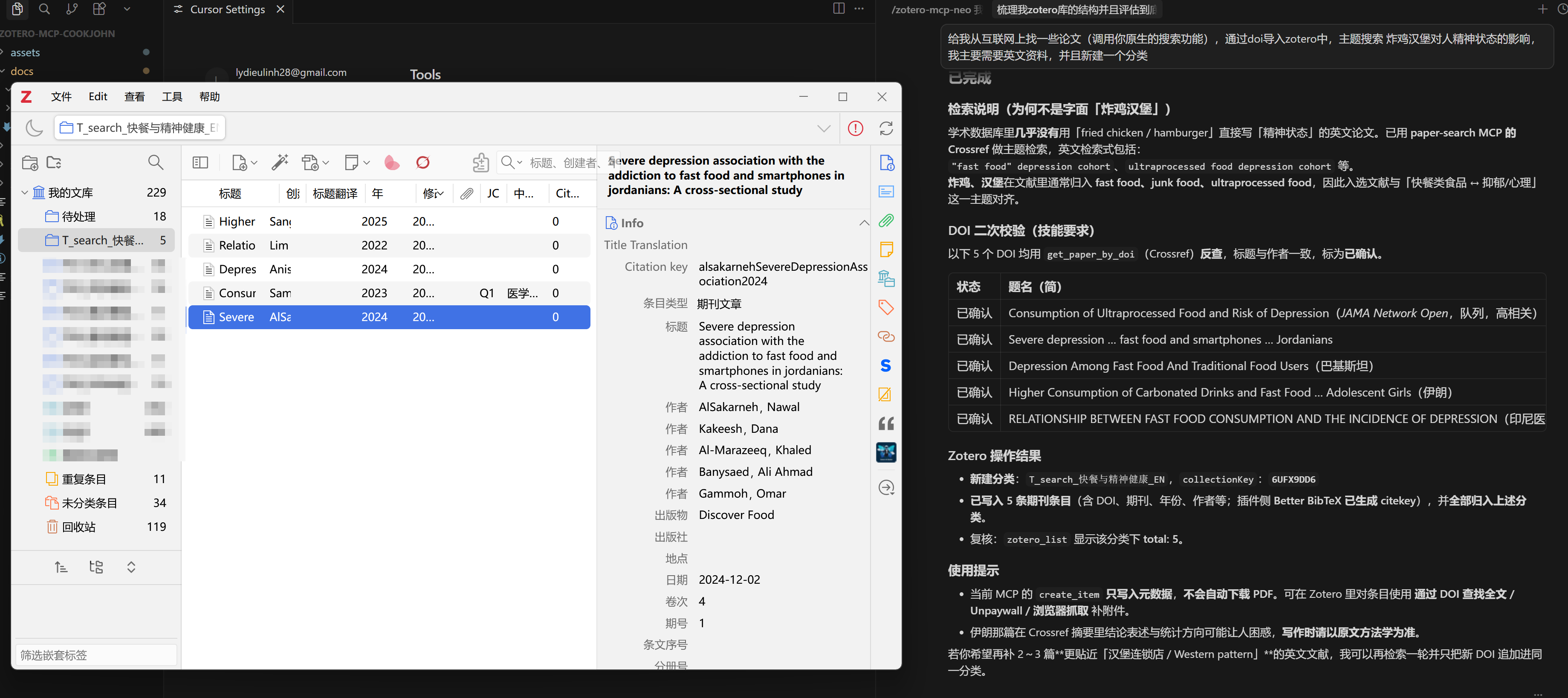 |
| Settings | 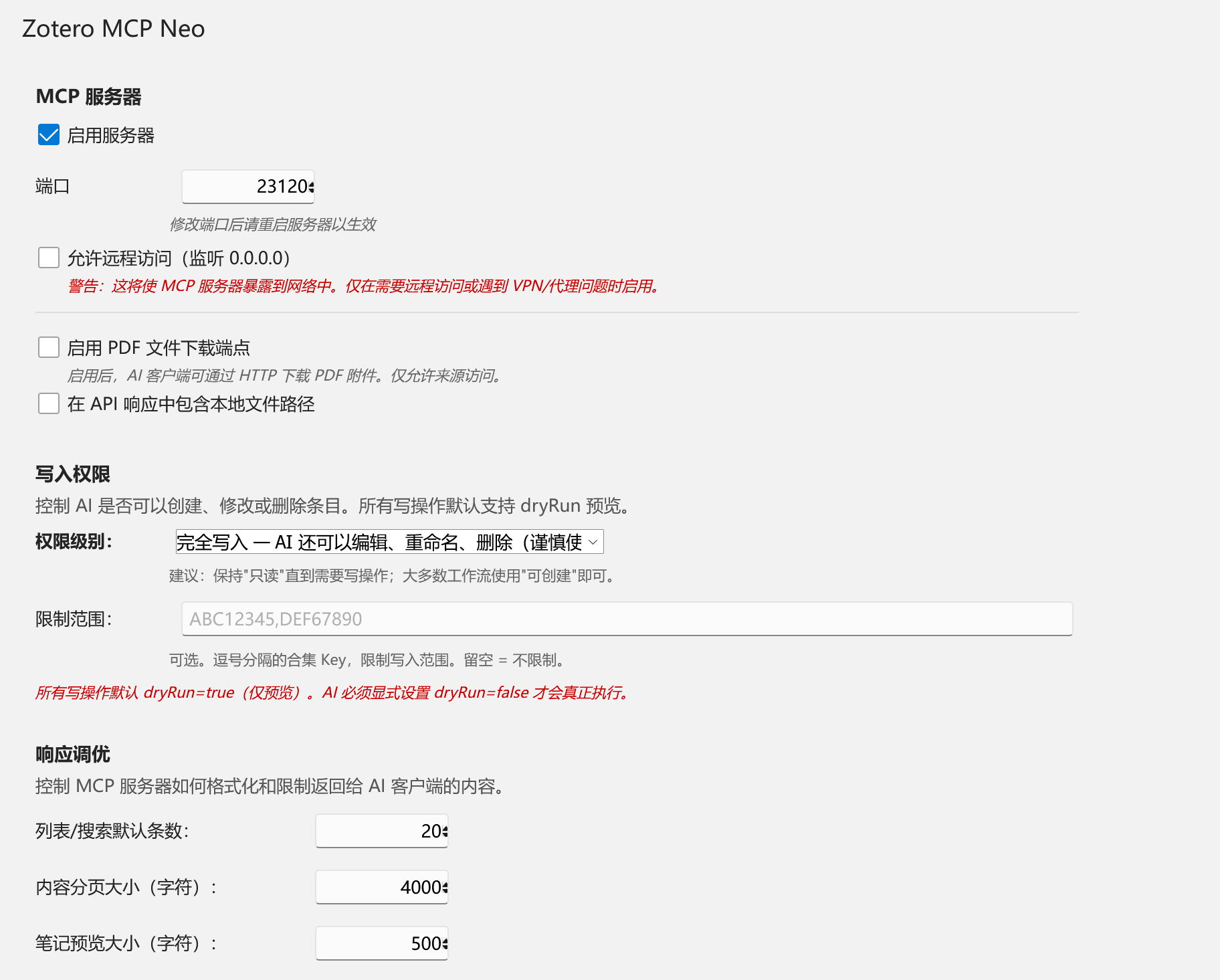 |
| Skim library | 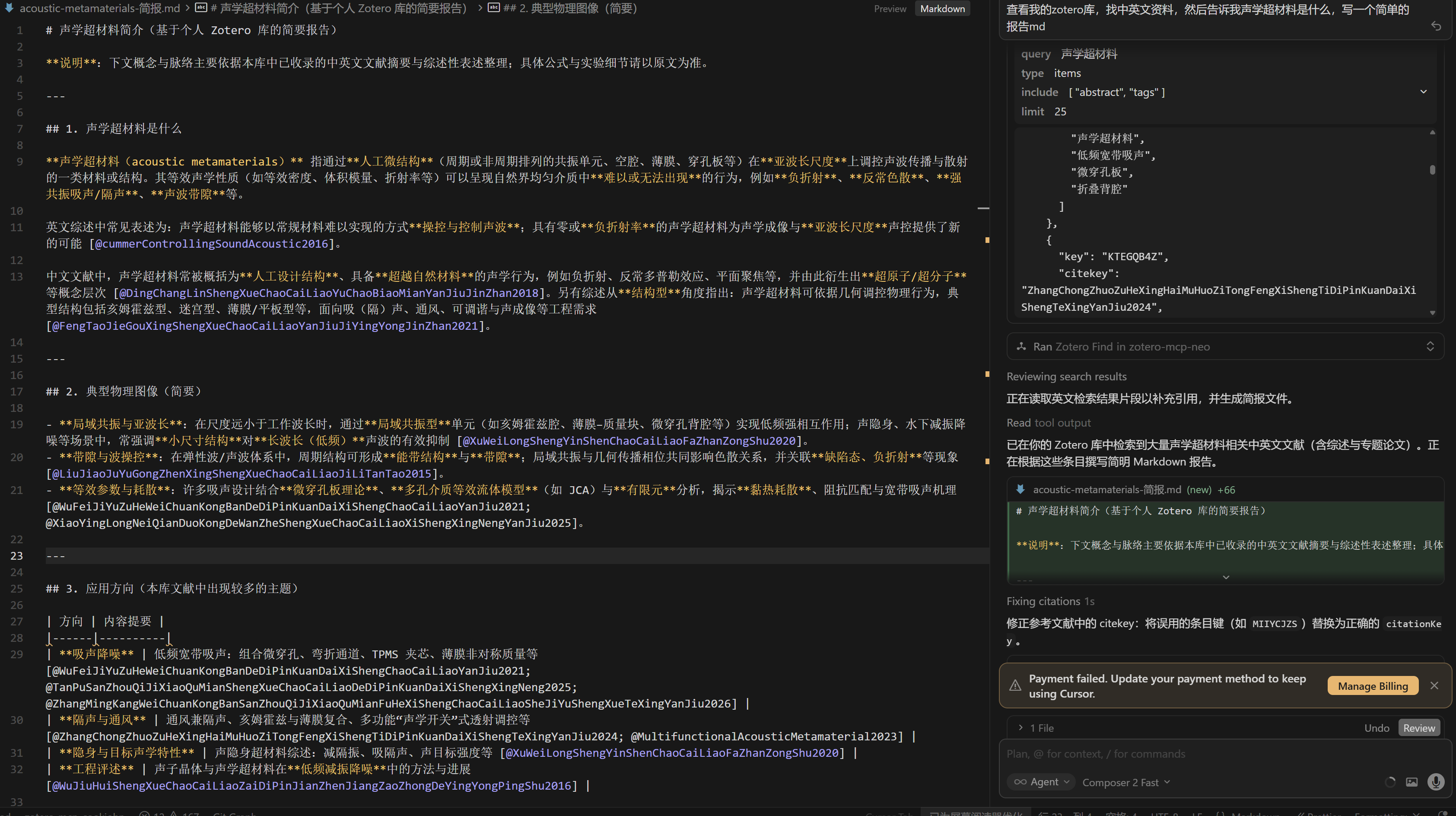 |
| Close reading | 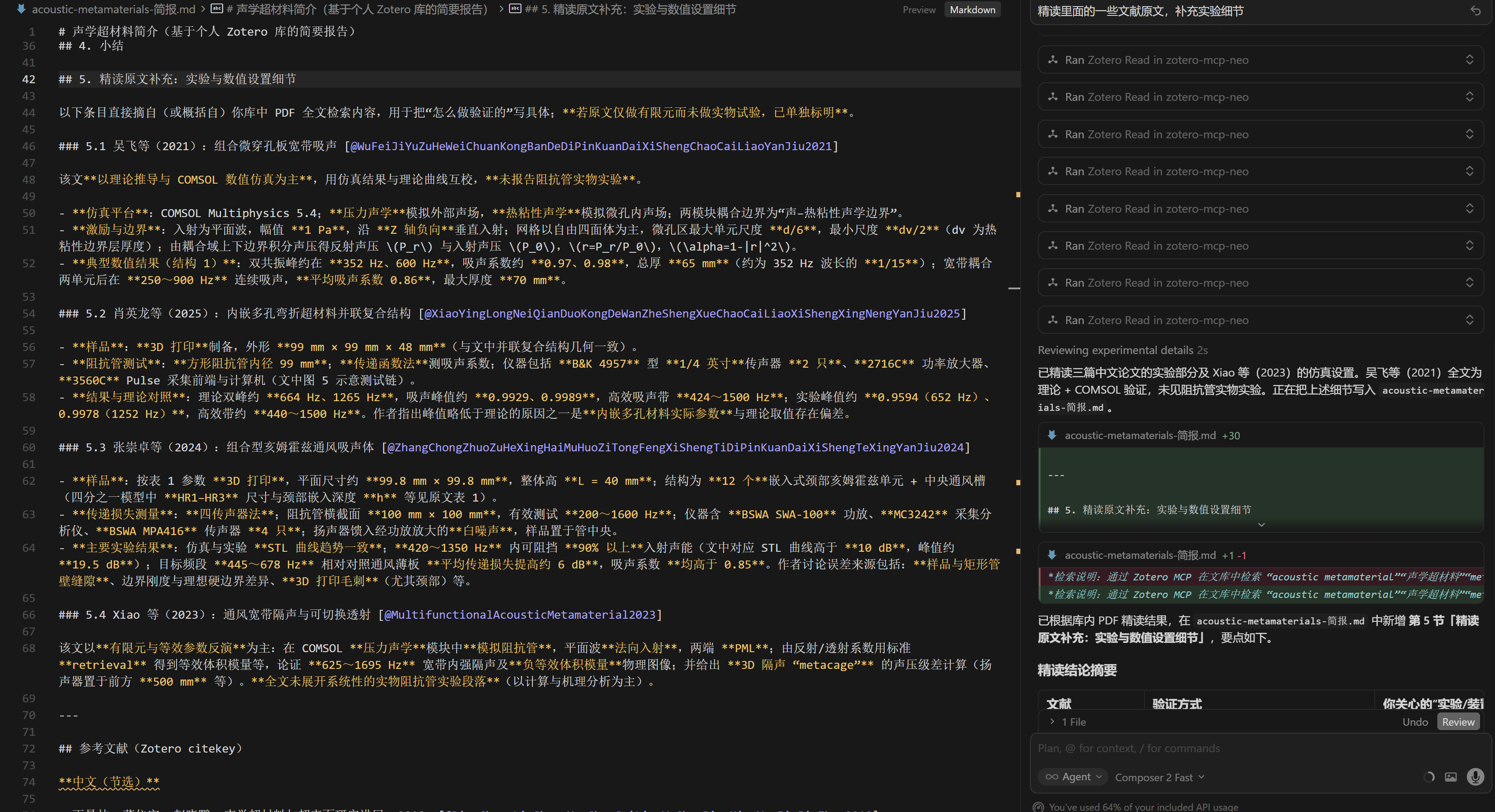 |
What's Different in Neo?
| Original | Neo | |
|---|---|---|
| Tools | 20+ individual tools | 6 unified tools (find / list / read / write / status / task) |
| Output control | mode parameter |
Explicit sections / include / page |
| Response | AI instruction wrappers | Raw data only |
| Write safety | Direct execution | dryRun-first + layered permissions |
Everything else — search engine, PDF extraction, annotation handling, semantic search, client config generator — is inherited from the original project.
Quick Start
1. Install the Plugin
- Download the latest
.xpifrom Releases - In Zotero →
Tools→Add-ons→ gear icon →Install Add-on From File... - Restart Zotero
After installation, Zotero’s built-in add-on updater can fetch newer versions from GitHub (the plugin ships an update_url pointing at the published update.json). Use Check for Updates in the Add-ons manager when you want to upgrade manually.
2. Enable the Server
Zotero → Edit → Settings → Zotero MCP Neo:
- Check Enable Server
- Default port:
23120
Write access: The default level is Create (new items and notes, organize collections). If you need move, delete, or full in-place edits, open Write Access in the same settings page and switch to Full or Custom.
3. Connect Your AI
You need both an MCP connection (so tools are available) and the Agent Skill (so the model follows safe write patterns). Do them in order:
Step 1: Configure MCP connection
Add this to your AI client's MCP configuration:
{
  "mcpServers": {
    "zotero-mcp-neo": {
      "transport": "streamable_http",
      "url": "http://127.0.0.1:23120/mcp"
    }
  }
}
Where to put this config
| Client | Config location |
|---|---|
| Cursor IDE | .cursor/mcp.json (project) or ~/.cursor/mcp.json (global) |
| Claude Desktop | claude_desktop_config.json (locations) |
| Claude Code | claude mcp add --transport http zotero-mcp-neo http://127.0.0.1:23120/mcp |
| Cherry Studio | Settings → MCP Servers → Import from JSON |
| Gemini CLI | ~/.gemini/settings.json |
| Chatbox | Settings → MCP Server Configuration |
| Trae AI | Ctrl+U → AI Management → MCP |
| Cline (VS Code) | MCP Servers → Advanced Settings |
| Continue.dev | ~/.continue/config.json |
| Codex CLI | codex mcp add zotero-mcp-neo http://127.0.0.1:23120/mcp -t http |
| Qwen Code | qwen mcp add zotero-mcp-neo http://127.0.0.1:23120/mcp -t http |
The plugin includes a Config Generator — open plugin settings, pick your client, and click Generate Config.
Step 2: Install the Agent Skill (recommended)
Agent skills teach your AI how to use the tools safely (e.g., always dryRun before writing).
Option A — Install from the plugin (recommended)
Zotero → Edit → Settings → Zotero MCP Neo → Agent Skills → choose your IDE (Cursor / Claude Code / Codex) → Install to IDE (or export to clipboard / file).
Option B — Copy the skill file
Copy docs/skills/SKILL.md into your IDE’s skill directory (create the folder if needed):
# Cursor
mkdir -p ~/.cursor/skills/zotero-mcp-neo
cp docs/skills/SKILL.md ~/.cursor/skills/zotero-mcp-neo/

# Claude Code
mkdir -p ~/.claude/skills/zotero-mcp-neo
cp docs/skills/SKILL.md ~/.claude/skills/zotero-mcp-neo/

# Codex CLI
mkdir -p ~/.codex/skills/zotero-mcp-neo
cp docs/skills/SKILL.md ~/.codex/skills/zotero-mcp-neo/
Option C — Paste the content
Open docs/skills/SKILL.md, copy the text, and paste it into your agent’s system prompt or rules file.
The 6 Tools
| Tool | Purpose | Example |
|---|---|---|
zotero_status |
Check connection, permissions, runtime config | {} |
zotero_list |
Browse collections, items, annotations | {scope: "collection:ABC123"} |
zotero_find |
Search by keywords with type/scope/filters | {query: "attention", type: "fulltext"} |
zotero_read |
Deep-read one entity with paginated content | {key: "XYZ789", sections: ["content"], page: 1} |
zotero_write |
Create/update/organize/delete (dryRun default) | {action: "create_item", params: {...}, dryRun: true} |
zotero_task |
[Experimental] Async AI tasks | Reserved for future use |
Key Design Highlights
- citekey: Responses include Better BibTeX citation keys when available
- Pagination: PDF content paginated at 4000 chars/page
- Timeout: 10s timeout with partial result fallback
- dryRun: All writes default to preview mode
- Unified response:
{ok: true, ...}or{ok: false, code: "...", error: "..."}
Full API reference and write action details → see docs/skills/SKILL.md
Features
- Smart Search — title, creator, year, tags, full-text, semantic search with relevance scoring
- Content Extraction — PDF full-text, notes, abstracts, webpage snapshots with pagination
- Annotation Analysis — search highlights by color, tags, and keywords
- Collection Management — browse and search collection hierarchies
- Semantic Search — embedding vectors via OpenAI, Ollama, Gemini, Alibaba, Zhipu, SiliconFlow, Voyage AI, etc.
- Safe Write Operations — create/update/delete with dryRun preview and layered permissions
- Agent Skills — exportable SKILL.md for Cursor, Claude Code, Codex
Plugin Settings
- Display language: Override plugin UI language (auto / English / 简体中文) at the top of the settings page if Zotero’s locale is wrong
- Server: Enable/disable, port, remote access, PDF download, file paths
- Write Access: Layered permissions (readonly / create / full / custom), collection restrictions — default create; use full or custom for destructive or advanced writes
- Response Tuning: List limits, content page size, note preview size, timeout
- Semantic Search: Provider presets, model, dimensions, rate limits, cost tracking, auto-index
- Agent Skills: Export/install SKILL.md to IDEs
- Client Config: Built-in generator for 12+ AI clients
Developer Guide
Prerequisites
- Zotero 7.0+ (including 8.x / 9.x per manifest) · Node.js 18+ · npm · Git
Versioning and releases: docs/development/versioning.md.
Build
git clone https://github.com/X-T-E-R/Zotero-MCP-Neo.git
cd Zotero-MCP-Neo/zotero-mcp-plugin
npm install
npm run build       # → .scaffold/build/
npm run start       # dev mode with hot reload
Architecture
AI Client ↔ Streamable HTTP ↔ Zotero Plugin (integrated MCP server)
                                    │
                      ┌─────────────┼─────────────┐
                      │             │             │
                 src/mcp/      src/modules/   addon/
                 (V2 tools)    (core services) (UI & i18n)
See docs/DESIGN.md for full architecture and design rationale.
Contributing
Fork → feature branch → commit → push → Pull Request
Troubleshooting
| Problem | Solution |
|---|---|
| Server not starting | Check if port 23120 is in use |
| AI can't connect | Ensure Zotero is running + server enabled |
| Tools not showing | Restart AI client after adding config |
| Timeout errors | Increase timeout in Response Tuning |
| Semantic search not working | Configure embedding API + build index |
| Write denied | Adjust write access level in settings |
License
Acknowledgments
- cookjohn/zotero-mcp — The original project. Plugin architecture, search engine, PDF processing, annotation extraction, semantic search, and more all originate from this excellent work.
- Zotero — The open-source reference manager.
- Model Context Protocol — The protocol enabling AI tool integration.
- zotero-plugin-template — The plugin scaffold.
Installing Zotero Neo
This server has no published package — it is built from source. Open the repository and follow its README.
▸ github.com/x-t-e-r/zotero-mcp-neoFAQ
Is Zotero Neo MCP free?
Yes, Zotero Neo MCP is free — one-click install via Unyly at no cost.
Does Zotero Neo need an API key?
No, Zotero Neo runs without API keys or environment variables.
Is Zotero Neo hosted or self-hosted?
Self-hosted: the server runs locally on your machine via the install command above.
How do I install Zotero Neo in Claude Desktop, Claude Code or Cursor?
Open Zotero Neo on unyly.org, pick your client tab (Claude Desktop, Claude Code, Cursor) and press Install — the config is generated automatically, no JSON editing.
Related MCPs
Fetch
Web content fetching and conversion for efficient LLM usage.
AWS KB Retrieval
Retrieval from AWS Knowledge Base using Bedrock Agent Runtime.
 by modelcontextprotocol
Spring AI MCP Server
Provides auto-configuration for setting up an MCP server in Spring Boot applications.
llm-analysis-assistant
A very streamlined mcp client that supports calling and monitoring stdio/sse/streamableHttp, and can also view request responses through the /logs page. It also
 by xuzexin-hz
Compare Zotero Neo with
Not sure what to pick?
Find your stack in 60 seconds
Author?
Embed badge for your README
Browse similar
All ai MCPs